






AI shipping automation is the use of artificial intelligence and rules-based software to handle the repetitive work in your shipping operation: processing orders, choosing carriers, printing labels, tracking parcels, and fixing delivery problems before customers complain. If your team still copies order data between spreadsheets, picks carriers by gut feel, or chases tracking links by hand, shipping automation software can give you back hours every single day. Logistics automation software is no longer a luxury for big enterprises. AI in logistics has become practical, affordable, and fast to set up, even for growing brands that ship a few hundred parcels a week.
The pressure is real. Customers expect two-day delivery, live tracking, and instant answers. Carriers change rates and service levels constantly. Margins are thin. Automated shipping software helps you meet those demands without hiring a bigger team for every spike in volume.
The industry numbers explain why shipping process automation is moving from nice-to-have to must-have.
The global logistics automation market is valued at about USD 39.5 billion in 2026 and is forecast to reach USD 104.9 billion by 2035, growing at 11.5% a year, according to Global Market Insights. Estimates differ between research firms, but every one of them points upward. Parcel volume tells the same story. Global volume reached 161 billion parcels in 2022, which works out to more than 5,100 parcels shipped every second, per the Pitney Bowes Parcel Shipping Index. That is 150% growth in six years, up from 64 billion in 2016, and the same index expects volume to most likely reach 225 billion by 2028, a 6% yearly growth rate. Global carrier revenue passed USD 485 billion in 2022, so even small gains from automated carrier selection add up fast. The carrier landscape is also shifting: in the latest US Parcel Shipping Index, Amazon Logistics overtook the traditional big carriers as the largest US parcel provider, with 6.9 billion parcels.
More parcels, more carriers, and tighter delivery promises mean logistics workflow automation is the practical way to keep shipping operations under control.
In this guide, we will explore what AI shipping automation actually means, why shipping process automation beats manual work, and the 10 tasks logistics teams can automate today. We will also compare these tasks in a simple table, show you how to choose AI-powered logistics software, walk through an implementation plan, and answer the questions people ask most. By the end, you will know exactly where to start with logistics workflow automation in your own business.
What Is AI Shipping Automation?
AI shipping automation means letting software make or prepare shipping decisions that people used to make one by one. Think of it as a very fast, very patient operations assistant. It reads orders, checks rules, compares carriers, creates documents, and watches shipments until they arrive.
It helps to separate two layers. The first is plain rules-based automation. If an order weighs under 500 grams and goes to a metro city, ship it with Carrier A. The second layer is AI in logistics, where models learn from your past shipments to predict delays, suggest the best carrier, flag risky addresses, and spot patterns no person would catch across thousands of orders.
Good shipping automation software combines both. Rules keep things predictable. AI handles the messy, changing parts. Together they power logistics automation software that can run your order-to-delivery automation from the moment a customer clicks “buy” to the moment the parcel lands at their door.
When people search for AI-powered logistics software, they usually want one thing: fewer manual steps and fewer mistakes. That is the right goal. Every manual touch is a chance for a typo, a delay, or a wrong label.
Why Shipping Process Automation Beats Manual Work
Manual shipping works until it doesn’t. Ten orders a day feels manageable. Three hundred orders a day, during a festive sale, with returns coming in and a carrier strike in one region, becomes chaos.
Shipping process automation fixes the weak spots of manual work:
- Speed. Automated order processing moves an order from checkout to dispatch-ready in seconds instead of minutes.
- Accuracy. Software does not mistype a pincode at 6 p.m. on a Friday.
- Cost. Automated carrier selection compares rates every time, so you stop overpaying on lanes where a cheaper partner performs just as well.
- Visibility. Shipment tracking automation gives your team and your customers one live view instead of ten carrier portals.
- Scale. Logistics workflow automation lets volume grow without headcount growing at the same pace.
There is also a people benefit that rarely gets mentioned. When shipping operations automation removes the dull work, your team spends time on problems that need judgment: negotiating with carriers, improving packaging, handling a high-value customer. That is better work, and it keeps good people longer.
Now let’s get into the tasks themselves.
10 Tasks Logistics Teams Can Automate With AI Shipping Automation
You do not have to automate everything on day one. Pick the tasks that cost you the most time or cause the most errors, then work down the list. Each task below is a place where logistics automation software pays off quickly.
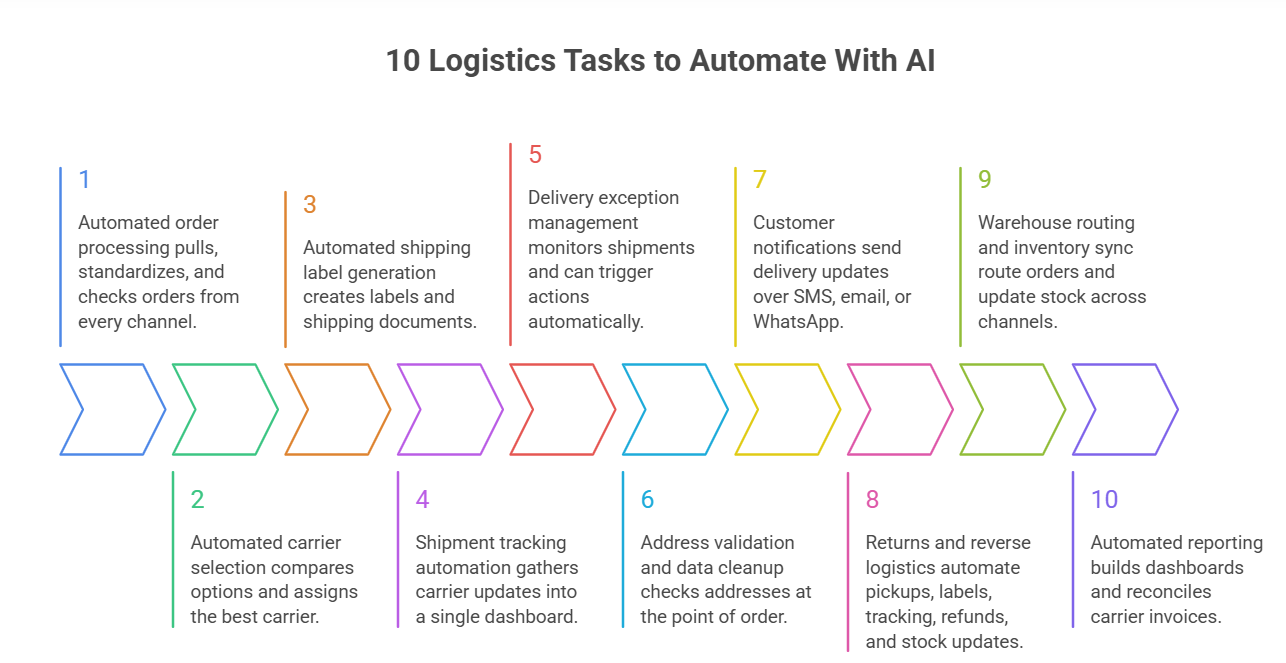
- Automated Order Processing
Every shipment starts with an order, and that is where most errors begin. Orders arrive from your website, marketplaces, WhatsApp stores, and B2B portals, each in a slightly different format. Someone has to gather them, clean them, and push them into the shipping system.
Automated order processing removes that step. The software pulls orders from every channel, standardizes the data, checks for missing fields, and creates a shipment record without anyone touching a keyboard. Bulk orders, split shipments, and cash-on-delivery flags are handled by rules you set once.
What it saves: hours of copy-paste work and the wrong-address mistakes that follow. Within shipping process automation, this is almost always the best first project because the payoff is immediate and easy to measure.
- Automated Carrier Selection
Choosing a carrier by hand means checking rate cards, service areas, delivery speed, and past performance for every order. Nobody does that properly at volume, so teams default to one or two carriers and overpay.
Automated carrier selection does the comparison for you. It weighs price, transit time, pincode serviceability, weight slabs, cash-on-delivery support, and each carrier’s recent delivery success rate. Then it assigns the best option in a fraction of a second.
AI in logistics makes this smarter over time. If a carrier starts slipping on a certain route, the system notices and shifts volume before your customers feel it. You can also set priorities, such as “cheapest unless the order is premium, then fastest.” This is one of the biggest savings levers in logistics process optimization, because small per-parcel gains add up across thousands of shipments.
- Automated Shipping Label Generation
Printing labels one at a time from carrier portals is slow and error-prone. Different carriers want different formats, and a wrong barcode can mean a parcel gets stuck at a hub.
Automated shipping label generation creates the correct label the moment a carrier is assigned. The label carries the right barcode, address, weight, and routing data in the carrier’s required format. You can print hundreds in one batch, add your own branding, and reprint instantly if something jams.
Good automated shipping software also generates the manifest, invoice, and pickup request together. That ties your shipping operations automation into one smooth step instead of four separate chores.
- Shipment Tracking Automation
Tracking is where manual teams lose the most time. Staff open carrier sites, paste in AWB numbers, and copy status updates into spreadsheets. Meanwhile customers keep asking, “Where is my order?”
Shipment tracking automation pulls status updates from every carrier into a single dashboard. Each parcel’s journey updates by itself: picked up, in transit, out for delivery, delivered, or stuck. Your team sees the whole picture at a glance, and customers can follow along through a branded tracking page.
The real value is fewer “where is my order” tickets. Brands that adopt shipment tracking automation often see support contacts about delivery drop sharply, because customers get the answer before they think to ask.
- Delivery Exception Management
Things go wrong in shipping. Customers are unavailable. Addresses are incomplete. Parcels are damaged or held at a hub. Under manual handling, these problems surface late, usually when an angry customer calls.
Delivery exception management turns that around. AI-powered logistics software monitors every shipment for signs of trouble: a missed delivery attempt, a stalled scan, an address query from the courier, a route running behind schedule. When it spots an exception, it can trigger an action automatically, such as messaging the customer to confirm the address, requesting a re-attempt, or alerting your team for high-value orders.
This is where AI in logistics earns its keep. Predictive models can flag shipments likely to fail before the first attempt, so you can fix the issue early. Strong delivery exception management protects your delivery success rate and your reputation.
- Address Validation and Data Cleanup
Bad addresses are one of the most expensive problems in shipping. Missing landmarks, wrong pincodes, and half-typed city names lead to failed deliveries and returns to origin, and each one costs you shipping twice plus a lost sale.
Logistics workflow automation can check every address at the point of order. It corrects pincodes, completes city and state fields, flags suspicious entries, and can even ask the customer to confirm when something looks off. For cash-on-delivery orders, it can score the risk of a failed delivery and trigger a confirmation call or message before dispatch.
This small step quietly improves everything downstream, from automated carrier selection to delivery exception management.
- Customer Notifications and Delivery Updates
Customers do not mind waiting as much as they mind not knowing. Proactive messages calm them down.
Order-to-delivery automation can send updates over SMS, email, or WhatsApp at every important point: order confirmed, shipped, out for delivery, delivered, delayed. Messages use your brand voice and include a tracking link. If a delay happens, the system can send an honest heads-up without anyone on your team lifting a finger.
This connects shipment tracking automation directly to the customer experience. It also reduces inbound support load, which frees your team for harder conversations.
- Returns and Reverse Logistics
Returns are shipping too, and they are often the messiest part of the process. Customers email a request, someone approves it, someone books a pickup, someone tracks the return, and someone updates inventory. Every handoff is a chance to drop the ball.
Shipping operations automation can run the whole reverse flow. A customer starts a return from a self-serve page, rules approve or flag it, a pickup is scheduled with the best carrier, a return label is generated, and the system tracks the parcel back to your warehouse. Refund triggers and stock updates follow automatically.
Brands that treat returns as part of their logistics automation software, not an afterthought, usually see faster refunds, happier customers, and cleaner inventory counts.
- Warehouse Routing and Inventory Sync
If you ship from more than one warehouse or store, deciding where each order should leave from matters a lot. Shipping from the wrong location means higher cost and slower delivery.
AI-powered logistics software can route each order to the best fulfillment point based on stock levels, distance to the customer, and carrier coverage. It syncs inventory across channels so you do not oversell, and it updates shipment status back to your store or marketplace so listings stay accurate.
This is order-to-delivery automation at its most connected. Orders, stock, carriers, and customers all stay in sync without manual updates between systems.
- Reporting, Freight Audit, and Performance Analytics
Most teams know they should review carrier performance and shipping cost, but pulling the data together takes so long that it rarely happens. Reports go stale, and weight disputes or billing errors slip through.
Automated reporting solves that. Logistics process optimization depends on clear numbers: cost per shipment, delivery success rate, average transit time, return rate, and carrier scorecards. Automated shipping software builds these dashboards live. It can also reconcile carrier invoices against agreed rates and weights, catching overcharges you would otherwise pay without noticing.
Once you can see what is working, you can negotiate better with carriers, fix weak lanes, and make every other task on this list perform better.
Comparison Table: 10 Shipping Tasks You Can Automate
Use this table to decide where to begin. Each row is one task, and each attribute sits in its own column so you can scan quickly.
| # | Task | Core Keyword | Manual Pain Point | What Automation Does | Main Benefit | Difficulty to Start |
| 1 | Order intake | Automated order processing | Copy-pasting orders from many channels | Pulls, cleans, and creates shipments automatically | Faster dispatch, fewer typos | Easy |
| 2 | Carrier choice | Automated carrier selection | Guessing the best carrier per order | Compares price, speed, and performance instantly | Lower cost per parcel | Medium |
| 3 | Labels and documents | Automated shipping label generation | Printing labels one by one from portals | Creates correct labels, manifests, and invoices in bulk | Time saved, fewer hub errors | Easy |
| 4 | Tracking | Shipment tracking automation | Checking carrier sites manually | Unifies live status in one dashboard | Fewer “where is my order” tickets | Easy |
| 5 | Problem shipments | Delivery exception management | Finding issues only after complaints | Detects and acts on exceptions early | Higher delivery success rate | Medium |
| 6 | Address quality | Logistics workflow automation | Wrong pincodes and incomplete addresses | Validates and corrects at checkout | Fewer failed deliveries | Easy |
| 7 | Customer updates | Order-to-delivery automation | Manual status emails and calls | Sends proactive SMS, email, or WhatsApp updates | Better customer experience | Easy |
| 8 | Returns | Shipping operations automation | Slow, multi-step return handling | Runs approval, pickup, tracking, and refund triggers | Faster refunds, cleaner stock | Medium |
| 9 | Routing and stock | AI-powered logistics software | Shipping from the wrong location | Routes orders by stock, distance, and carrier coverage | Lower cost, faster delivery | Hard |
| 10 | Reporting and audit | Logistics process optimization | Stale spreadsheets and missed overcharges | Builds live dashboards and audits carrier bills | Smarter decisions, saved money | Medium |
How to Choose the Right Shipping Automation Software
Not every platform fits every business. Before you commit to logistics automation software, check these points:
- Carrier coverage. The platform should connect to the carriers you already use and the ones you may want. More options make automated carrier selection more useful.
- Integrations. It should plug into your store, marketplace, ERP, or warehouse system without custom coding.
- Rule flexibility. Good shipping automation software lets you build your own rules, not just pick from fixed templates.
- AI features that matter. Look for predictive delay alerts, smart carrier recommendations, and address risk scoring, not just a dashboard with an “AI” label.
- Tracking and notifications. Strong shipment tracking automation includes a branded tracking page and customer messaging.
- Reporting depth. You want carrier scorecards, cost analysis, and invoice reconciliation built in.
- Support and onboarding. Even the best automated shipping software fails if your team cannot get set up. Ask what help you get.
- Pricing clarity. Understand per-shipment fees, subscription costs, and any add-ons before you sign.
Ask for a live demo using your own order data. A platform that handles your real, messy volume tells you far more than a polished sales deck.
How to Implement Shipping Process Automation Step by Step
Rolling out AI shipping automation does not need a big-bang launch. A phased plan works better and carries less risk.
Step 1: Map your current workflow. Write down every step from order to delivery. Note who does what, how long it takes, and where mistakes happen. This map shows you where logistics workflow automation will help most.
Step 2: Pick two or three quick wins. Automated order processing, automated shipping label generation, and shipment tracking automation are common starting points. They are simple and visible.
Step 3: Clean your data. Automation magnifies whatever you feed it. Fix product weights, dimensions, and address formats first so the software has good inputs.
Step 4: Set your rules. Decide how automated carrier selection should prioritize cost versus speed. Define what counts as a delivery exception and what action follows.
Step 5: Pilot with a small batch. Run a week of orders through the new setup alongside your old process. Compare cost, speed, and error rates.
Step 6: Train your team. Show people what changes and what stays the same. Make it clear that shipping operations automation removes drudgery and does not replace their judgment.
Step 7: Measure and expand. Track cost per shipment, delivery success rate, support tickets, and time saved. Then add the next task from the list, whether that is returns, routing, or reporting.
Step 8: Keep tuning. Carriers change, seasons shift, and customers evolve. Review your rules monthly. Logistics process optimization is an ongoing habit, not a one-time project.
Common Mistakes to Avoid
Many teams stumble in the same places, so here is what to watch for.
- Automating a broken process. If your workflow is confusing, shipping process automation will only make the confusion faster. Fix the process first.
- Ignoring data quality. Wrong weights and bad addresses will undermine even the best AI-powered logistics software.
- Over-relying on the cheapest carrier. Automated carrier selection should balance price with delivery success, or returns will eat your savings.
- Skipping exception rules. Without clear delivery exception management, automation just hides problems until they pile up.
- Forgetting the customer. Order-to-delivery automation should make the buyer’s experience better, so test the messages and tracking page yourself.
- Not measuring results. If you do not track before and after numbers, you cannot prove the value or find what to improve.
What Results Can You Expect From Logistics Automation Software?
Results depend on your volume and starting point, but the pattern is consistent. Teams that adopt logistics automation software usually report faster order dispatch, lower shipping cost per parcel, fewer failed deliveries, and a sharp drop in delivery-related support tickets. Finance teams like the cleaner invoice reconciliation. Operations teams like having one dashboard instead of many carrier portals. Customers like knowing where their parcel is.
The gains compound. Better addresses improve automated carrier selection. Better carrier data improves delivery exception management. Better exception handling improves customer messaging. Each piece of AI shipping automation makes the next piece work better, which is why starting early matters.
Frequently Asked Questions About AI Shipping Automation
What is AI shipping automation?
AI shipping automation is the use of artificial intelligence and rules-based software to handle shipping tasks like order processing, carrier selection, label creation, tracking, and exception handling without manual work.
What tasks can logistics teams automate?
Logistics teams can automate order processing, carrier selection, shipping label generation, shipment tracking, delivery exception management, address validation, customer notifications, returns, warehouse routing, and reporting.
How does automated carrier selection work?
Automated carrier selection compares carriers on price, transit time, serviceability, and past performance for each order, then assigns the best option based on rules you set. AI models can improve those choices over time using your shipment history.
Is shipping automation software only for large companies?
No. Shipping automation software works for small and mid-sized businesses too. Many platforms scale with volume, so you can start with a few hundred shipments a month and grow from there.
How much can shipping process automation save?
Savings vary, but most businesses see lower cost per shipment, fewer failed deliveries, and significant time saved on manual tasks. The biggest gains usually come from carrier selection, fewer returns to origin, and reduced support load.
What is the difference between logistics workflow automation and AI in logistics?
Logistics workflow automation follows fixed rules to move work through steps. AI in logistics learns from data to predict delays, recommend carriers, and detect risks. The best systems use both.
How long does it take to set up automated shipping software?
Basic setups with order sync, label generation, and tracking can go live in days. More advanced shipping operations automation, such as multi-warehouse routing, can take a few weeks.
Conclusion: Start Small, Automate Smart
AI shipping automation is not about replacing your team. It is about taking repetitive, error-prone work off their plates so they can focus on what actually grows the business. From automated order processing and automated shipping label generation to shipment tracking automation and delivery exception management, every task in this guide removes friction between the order and the doorstep.
Start with the easy wins. Build confidence. Then expand your logistics automation software to cover carrier selection, returns, routing, and reporting. Over time, your order-to-delivery automation becomes a quiet engine that runs in the background while your customers enjoy faster, more reliable delivery.
If you are ready to put shipping process automation into practice, eShipz is built for exactly this. It brings multi-carrier shipping, automated carrier selection, label generation, shipment tracking automation, and NDR and exception management into one platform, so your team can move from manual shipping to AI-powered logistics software without the headache.