







India’s e-commerce industry was valued at US$125 billion in 2024 and is projected to reach US$345 billion by 2030, according to IBEF’s e-commerce industry report. Every one of those orders ends with a parcel, and every parcel needs a correct label. That is where shipping label automation earns its place in the warehouse.
Most growing brands still create labels by hand or with half-connected tools. Someone copies an address, picks a courier, downloads a PDF and prints it. At 50 orders a day this feels fine, and at 1,000 orders a day it quietly becomes your biggest source of delay and rework.
This guide explains shipping label automation in plain terms. You will see why manual labels fail, what the failure costs in a worked example, and a seven-step workflow you can set up this month. It also covers a comparison of manual and automated work, a checklist, common mistakes and the KPIs to track.
What Is Shipping Label Automation?
Shipping label automation is the use of software to create, assign and print shipping labels without a person typing order data into each one. The system reads the order, picks the courier, requests an airway bill (AWB) number and produces a label in the correct format. Your team only scans, packs and hands over.
A good setup connects four things: your sales channels, your courier accounts, your warehouse printers and your tracking. When one of them is missing, people fill the gap by hand, and errors return.
Shipping label automation is not the same as simply printing in bulk. Bulk printing speeds up the print step, but the data behind each label can still be wrong. Real shipping label automation fixes the data first, then the print.
The idea matters most for brands with high order volume, several couriers or more than one warehouse. A single-courier seller with ten orders a day can manage without it. A fashion, beauty or electronics brand on three channels cannot.
Why Manual Labels Fail: Common Causes
Manual label work fails for predictable reasons. Most of them come from people handling the same data more than once. The table below lists the usual causes and whether shipping label automation can remove them.
| Cause | What happens | Fixed by automation? |
|---|---|---|
| Re-typed addresses | Pincode, phone or house number is copied wrongly | Yes, data flows from the order |
| Wrong courier choice | A parcel is labelled for a courier that does not serve the pincode | Yes, rules check serviceability |
| Mismatched weight | Declared weight differs from the packed weight | Partly, with scan and weigh steps |
| COD amount errors | The collect-on-delivery value is missing or wrong | Yes, value comes from the order |
| Wrong label format | The printer or courier rejects the label size | Yes, templates are set once |
| Duplicate labels | Two AWBs are made for one order | Yes, one order maps to one AWB |
| Peak-day backlog | Staff cannot keep up with order spikes | Mostly, with bulk generation |
Notice how many causes are about copying. Each copy step is a chance for a mistake, and each mistake has a delivery cost. A pincode typo, for example, can send a parcel to the wrong hub and add days to the journey.
Weight is a special case, because a label carries the declared weight that the courier later checks. If you want to understand that problem in depth, read our guide on weight discrepancy in shipping. A good setup reduces the chance of a wrong declared weight reaching the label.
There is also a people cost. Staff who spend hours on repetitive typing lose focus, and the late-afternoon label batch is usually the one with the most mistakes. Moving that work to rules gives your team time for packing quality, inventory checks and exception handling.
Speed is the other pressure. Customers now expect a dispatch update within a day, and marketplaces penalise late handover. A slow label step pushes the pickup cut-off and delays every parcel behind it.
What a Correct Shipping Label Must Carry
A label is a small document with a big job. A courier hub scans it in seconds, so every field must be complete, readable and consistent with the order. If one field is wrong, the parcel slows down or stops.
| Label field | Why it matters | Common error |
|---|---|---|
| AWB number and barcode | Links the parcel to tracking and billing | Duplicate or unreadable barcode |
| Consignee name and phone | Lets the courier contact the customer | Missing or truncated phone number |
| Full address and pincode | Decides the route and delivery hub | Wrong or outdated pincode |
| Payment mode and COD value | Tells the courier how much to collect | Prepaid parcel marked as COD |
| Declared weight and size | Sets the freight charge | Weight copied from the catalogue, not the pack |
| Return address | Guides undelivered parcels back to you | Old warehouse address |
| Order ID and SKU summary | Helps your team match parcel to order | Order ID left off the label |
Many of these fields are simple, but they come from different places. Address and phone come from the customer, weight from the warehouse, and COD value from the payment gateway. A good system pulls each one from its source of truth instead of asking a person to merge them.
Keep the label clean. Crowded labels print poorly and fail scans, so show only what the courier and your packer need.
What Manual Labels Cost: An Illustrative Model
The cost of manual labels hides in small pieces: staff minutes, reprints, delayed dispatch and reshipped parcels. To make it visible, the model below uses hypothetical numbers. Replace them with your own data before you decide anything.
The assumptions are 1,000 orders a day for 30 days, which is 30,000 labels a month. Staff time costs ₹250 an hour, and each label error costs ₹150 in rework, reshipping or delay. These figures are illustrative, not benchmarks.
| Assumption (illustrative) | Manual | Partly automated | Full shipping label automation |
|---|---|---|---|
| Seconds per label | 90 | 45 | 15 |
| Label error rate | 2% | 1% | 0.3% |
| Monthly labels | 30,000 | 30,000 | 30,000 |
| Staff hours per month | 750 | 375 | 125 |
| Labour cost (₹250 per hour) | ₹1,87,500 | ₹93,750 | ₹31,250 |
| Error cost (₹150 per error) | ₹90,000 | ₹45,000 | ₹13,500 |
| Total monthly cost | ₹2,77,500 | ₹1,38,750 | ₹44,750 |
In this hypothetical case, full shipping label automation cuts the monthly label cost by about 84%. Even the partly automated option saves half. The exact figures will differ for your business, but the pattern holds: cost falls with every manual step you remove.
The model leaves out the larger costs that errors cause later. These include customer complaints, return-to-origin shipments and lost repeat orders. Those costs make the case for shipping label automation stronger, not weaker.
How Shipping Label Automation Works: A 7-Step Workflow
A working setup follows the same path for every order. The infographic below shows the seven steps in sequence, and the sections after it explain each one.
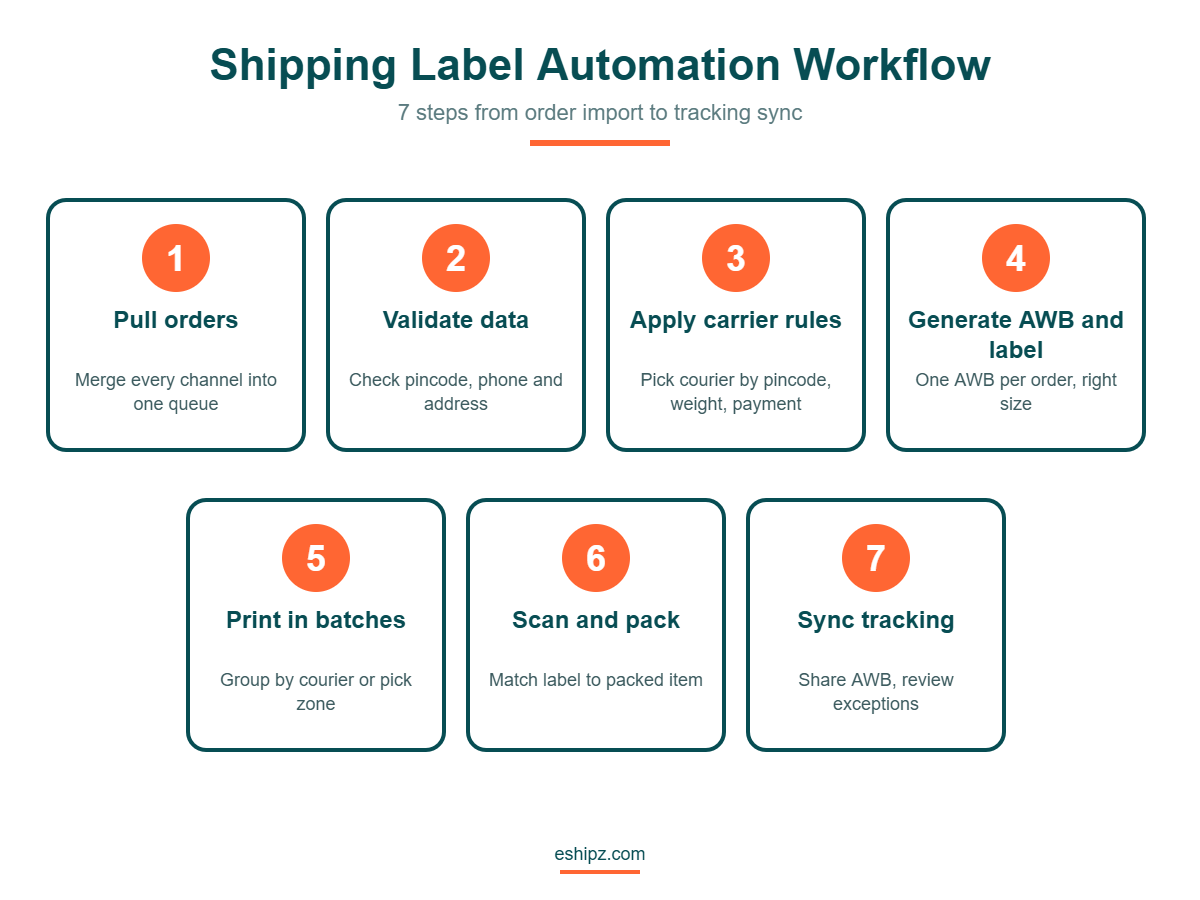
Step 1: Pull orders into one queue
Connect every sales channel so orders land in a single list. Without this step, shipping label automation has nothing reliable to work from. Remove duplicate and cancelled orders at this point.
Step 2: Clean and validate the data
Check each address for a valid pincode, a working phone number and a complete street line. Flag orders that fail the check before a label exists. Fixing a wrong address is cheap now and costly after dispatch.
Step 3: Apply carrier allocation rules
Set rules that choose the courier by pincode, weight, payment mode and past performance. The rule engine replaces a person guessing at the best option. Review the rules monthly as carrier performance changes.
Step 4: Generate the AWB and label
The system requests an AWB from the chosen courier and builds the label in the right size. Each order gets one AWB, linked to the order ID. This is the core of the whole workflow.
Step 5: Print in batches
Send labels to the warehouse printer in batches grouped by courier or pick zone. Use thermal printers and a standard label size to avoid misprints. Keep a reprint option, because paper jams happen.
Step 6: Scan, pack and hand over
Staff scan the label against the packed item before sealing the parcel. A scan catches a wrong item or a wrong label at the last safe moment. Then the courier pickup scan confirms the handover.
Step 7: Sync tracking and review exceptions
Push the AWB to the customer and to your tracking view straight away. Review failed or delayed parcels daily. This closes the loop, and the exceptions teach you which rules to improve.
Manual vs Automated Shipping Labels: A Side-by-Side View
Teams often ask whether automation is worth the setup effort. The comparison below shows where the two approaches differ in daily work.
| Area | Manual labels | Shipping label automation |
|---|---|---|
| Data entry | Typed or pasted per order | Pulled from the order automatically |
| Courier selection | Picked by a person | Chosen by rules |
| Speed at peak | Falls as volume rises | Stays steady with bulk generation |
| Error checks | Visual, after printing | Validation before the label exists |
| Audit trail | Spreadsheets and memory | Every label linked to an order and a time |
| Staff skill needed | High, with training for each courier | Lower, because rules hold the knowledge |
| Scalability | Needs more people | Needs more rules and printers |
The biggest difference is where mistakes are caught. In a manual flow, errors appear after the label is printed or after the parcel ships. With shipping label automation, most errors are blocked before printing.
A 30-Day Rollout Plan
You do not need a big-bang launch. A phased plan limits risk and gives your team time to learn. The timeline below is a suggestion, so adjust it to your volume and team size.
| Week | Focus | Outcome to check |
|---|---|---|
| Week 1 | Connect channels and courier accounts, clean address data | Orders appear in one queue with valid pincodes |
| Week 2 | Write carrier rules and set label templates | Test AWB requests succeed for every courier |
| Week 3 | Pilot with one warehouse shift or 50 orders a day | Error rate and seconds per label are measured |
| Week 4 | Roll out to all orders and review exceptions daily | Manual overrides stay low and are explained |
During the pilot, keep one person on the old process as a backup. Compare both results at the end of week three, and only then switch fully.
Handling Exceptions and Special Cases
Real warehouses are never perfectly regular. A few special cases need clear rules, otherwise staff fall back to manual work and the benefits fade.
Cash on delivery orders need the exact collect amount on the label, and the amount must match the order after any discount. Fragile or oversized parcels may need a courier that handles them, so tag those SKUs in your catalogue. Multi-parcel orders need one AWB per box, with labels marked such as 1 of 2 and 2 of 2.
Returns need their own label flow. A return label should point to the right warehouse and link back to the original order, so refunds are quick. If you ship across borders, add customs fields and use a separate template.
Finally, plan for failure. Couriers go offline, APIs time out and printers jam. Keep a fallback courier in your rules, a reprint option at every station and a manual override that always asks for a reason.
Shipping Label Automation Checklist
Use this checklist before you switch on automation for all orders. Work through it with your warehouse lead and your operations manager.
- Confirm that every sales channel sends orders to one queue.
- Check that your pincode and address validation rules are active.
- List your courier accounts and test an AWB request for each one.
- Define carrier rules by pincode, weight and payment mode.
- Set one standard label size and test it on your thermal printer.
- Add a scan step that matches the label to the packed item.
- Decide who owns exceptions and how fast they must be fixed.
- Run a pilot with 50 orders and compare errors against manual work.
- Train two people on reprints and manual overrides.
- Review the first week’s data and tighten the rules.
Do not skip the pilot. A small test finds label size problems and missing courier settings while the cost is still low. Most teams that run a pilot find two or three rule gaps in the first day.
Common Mistakes in Shipping Label Automation
Automation does not fix a messy process, it speeds it up. These mistakes appear again and again when brands roll out shipping label automation.
- Automating before cleaning the order data, which scales the errors.
- Using one default courier for every order, which ignores serviceability.
- Skipping the weight step, which leads to billing disputes later.
- Allowing free manual overrides without a reason code.
- Using different label sizes across printers and couriers.
- Ignoring exceptions until the end of the week.
- Not training staff for the day the system is slow or down.
The fix for most of these is discipline, not technology. Write down the rule, assign an owner and review it on a fixed date. Shipping label automation works best when the team trusts the rules and still knows how to override them safely.
KPIs to Track for Shipping Label Automation
You cannot improve what you do not measure. Track a small set of numbers weekly and compare them with your manual baseline.
| KPI | What it tells you | How to read it |
|---|---|---|
| Seconds per label | Speed of the label step | Should fall as automation grows |
| Label error rate | Share of labels with wrong data | Aim for a steady decline |
| Orders dispatched same day | Warehouse flow and cut-off health | Higher is better |
| Manual override share | How often people bypass rules | A high share points to weak rules |
| Reprints per 100 labels | Printer, size or data problems | Spikes show a setup fault |
| Exceptions closed in 24 hours | Speed of fixing failed AWBs | Higher is better |
Set your own targets after a month of data instead of copying a number from another company. Every business has a different order mix, courier set and error cost. Your own baseline is the fairest benchmark.
How eShipz Supports Shipping Label Automation
eShipz is a multi-carrier shipping platform. According to the eShipz website, its AutoShip Hub handles label generation and courier sync, and the platform lists 500+ carrier integrations. That gives a brand one place to create labels across many couriers.
Its CarrierSmart AI chooses carriers by speed, cost and performance, which supports step three of the workflow above. Track360 shows every shipment in one dashboard with delay alerts, so exceptions in step seven are easy to review.
For brands that want to see how this fits their own volume, you can explore eShipz shipping automation and compare it with your current process. Start with a small pilot and measure the label error rate before and after.
Conclusion
Labels look like a small task, yet they sit between your order and your customer. Shipping label automation removes repeated typing, blocks bad data before printing and keeps dispatch steady when orders spike. The illustrative model above shows how quickly manual minutes and error costs add up.
Start with clean data, add clear carrier rules, and pilot with a small batch. Track seconds per label and the error rate every week. With steady attention, shipping label automation can turn a daily bottleneck into a routine step.
Frequently Asked Questions About Shipping Label Automation
What is shipping label automation?
Shipping label automation is software that creates, assigns and prints shipping labels from order data without manual typing. It requests the AWB from the courier and builds the label in the right format. Staff only scan, pack and hand over.
Is shipping label automation only for large brands?
No. Any seller with growing order volume or more than one courier can benefit. Smaller teams often see the gain sooner, because they have no spare staff to fix label errors.
How long does it take to set up shipping label automation?
Setup time depends on your channels, courier accounts and printers. A pilot with a small batch can run within days once accounts are connected. Plan extra time to write and test your carrier rules.
Does shipping label automation reduce delivery errors?
It reduces errors that come from typing and copying, such as wrong pincodes or COD amounts. It cannot fix a wrong address that the customer entered. Address validation before label creation catches many of those cases.
Which label printer works best?
Most warehouses use thermal printers with a standard label size, because they are fast and need no ink. Check your couriers’ label specifications before you buy. Test one printer in a pilot before you roll out more.
Can I still print a label manually when the system is slow?
Yes, and you should plan for it. Keep a manual override with a reason code and train two people to use it. This keeps dispatch moving while the issue is fixed.
How do I know if shipping label automation is working?
Track seconds per label, label error rate, same-day dispatch and reprints per 100 labels. Compare them with your manual baseline each week. If errors and time both fall, the setup is working.