








McKinsey authors have noted that an online order’s cost per unit can easily be four to five times higher than traditional brick-and-mortar replenishment. Now picture that same order leaving your warehouse as two or three separate parcels. Split shipment management decides when that is worth doing and when it quietly eats your margin.
Most Indian D2C brands never plan for this. A customer orders three items, one is out of stock at the nearest warehouse, and the system ships whatever it can. The result is extra freight, extra packaging, confused customers and more calls to support.
This guide explains split shipment management in plain terms. You will see why orders split, what each split costs with a worked example, and a seven-step workflow you can put in place this month. It also covers decision rules, a prevention checklist, common mistakes and the KPIs to watch.
What Is Split Shipment Management?
A split shipment happens when one customer order leaves in more than one package. The packages may travel from the same warehouse, from different warehouses, or with different carriers. Each package gets its own airway bill (AWB), its own tracking status and its own delivery attempt.
Split shipment management is the set of rules, data and tools that control this process. It answers four questions for every order: should it split, where does each part ship from, which carrier takes each part, and how is the customer told.
Without split shipment management, splitting is an accident. With it, splitting becomes a deliberate choice that you make only when the benefit beats the cost.
The idea matters most for brands that sell many SKUs, keep stock in more than one location, or run a marketplace-style catalogue. A single-SKU brand with one warehouse rarely splits. A fashion, electronics or beauty brand with three fulfilment points splits every day.
Why Orders Split: Common Causes
Orders split for operational reasons, not customer reasons. Knowing the cause tells you whether the split is avoidable.
| Cause | What happens | Avoidable? |
|---|---|---|
| Stock in different locations | Items sit in two or more warehouses or stores | Often, with better stock placement |
| Partial stock-out | One item is unavailable, the rest is ready | Sometimes, by holding or substituting |
| Size or fragility | Items cannot share one box safely | Rarely |
| Weight slab effects | Two lighter parcels cost less than one heavy parcel | Yes, if you compare costs first |
| Carrier restrictions | A carrier will not take a certain category or pincode | Sometimes, with another carrier |
| Different delivery addresses | Part of the order is a gift for another address | No |
| Mixed order types | Prepaid and cash on delivery (COD) items in one cart | Often, with clear order rules |
The pattern in this table is useful because it shows that most splits start with inventory placement, not with shipping. Fix placement first and the shipping problem shrinks.
Notice the second row. A partial stock-out is the most common trigger, and it is also the one where a quick decision saves the most money. Shipping the available items now feels fast. It may still cost more than waiting two days and sending one parcel.
What Split Shipment Management Really Costs
Every extra parcel adds direct and hidden cost. Direct costs are freight, packaging and pickup handling. Hidden costs are extra delivery attempts, extra support contacts, higher return risk and slower reconciliation.
The numbers below are illustrative only. They use a hypothetical rate card so you can see the mechanics. Your own carrier rates, zones and packaging costs will differ.
Assumptions for the example: the rate is ₹60 for the first 500 g and ₹40 for each extra 500 g or part of it. Packaging costs ₹12 per parcel. The order has three items weighing 0.4 kg, 0.6 kg and 0.9 kg, which is 1.9 kg in total.
| Scenario (illustrative) | Parcels | Billable weight | Freight | Packaging | Total | Change vs one parcel |
|---|---|---|---|---|---|---|
| Ship together | 1 | 2.0 kg | ₹180 | ₹12 | ₹192 | Baseline |
| Split in two (0.4 + 0.6 kg together, 0.9 kg alone) | 2 | 1.0 kg and 1.0 kg | ₹200 | ₹24 | ₹224 | +17% |
| Split in three | 3 | 0.5 kg, 1.0 kg and 1.0 kg | ₹260 | ₹36 | ₹296 | +54% |
In this example, a three-way split costs 54% more than shipping together. The weight did not change. Only the number of parcels and the way the slabs round up did.
Now add the hidden costs. If one of the three parcels fails its first delivery attempt, you pay for another attempt and the customer waits longer for a complete order. If the customer returns one item, you now run a return for a partial order. Strong split shipment management keeps these effects visible so they are not blamed on the carrier.
The cost can also flip. If one item is bulky and the others are small, separate parcels may fall into cheaper slabs than one oversized parcel. The point of split shipment management is to compare the options before the label prints. Our guide to weight discrepancy in shipping shows how rounding and volumetric weight can change a bill after dispatch, which is another reason to check the numbers first.
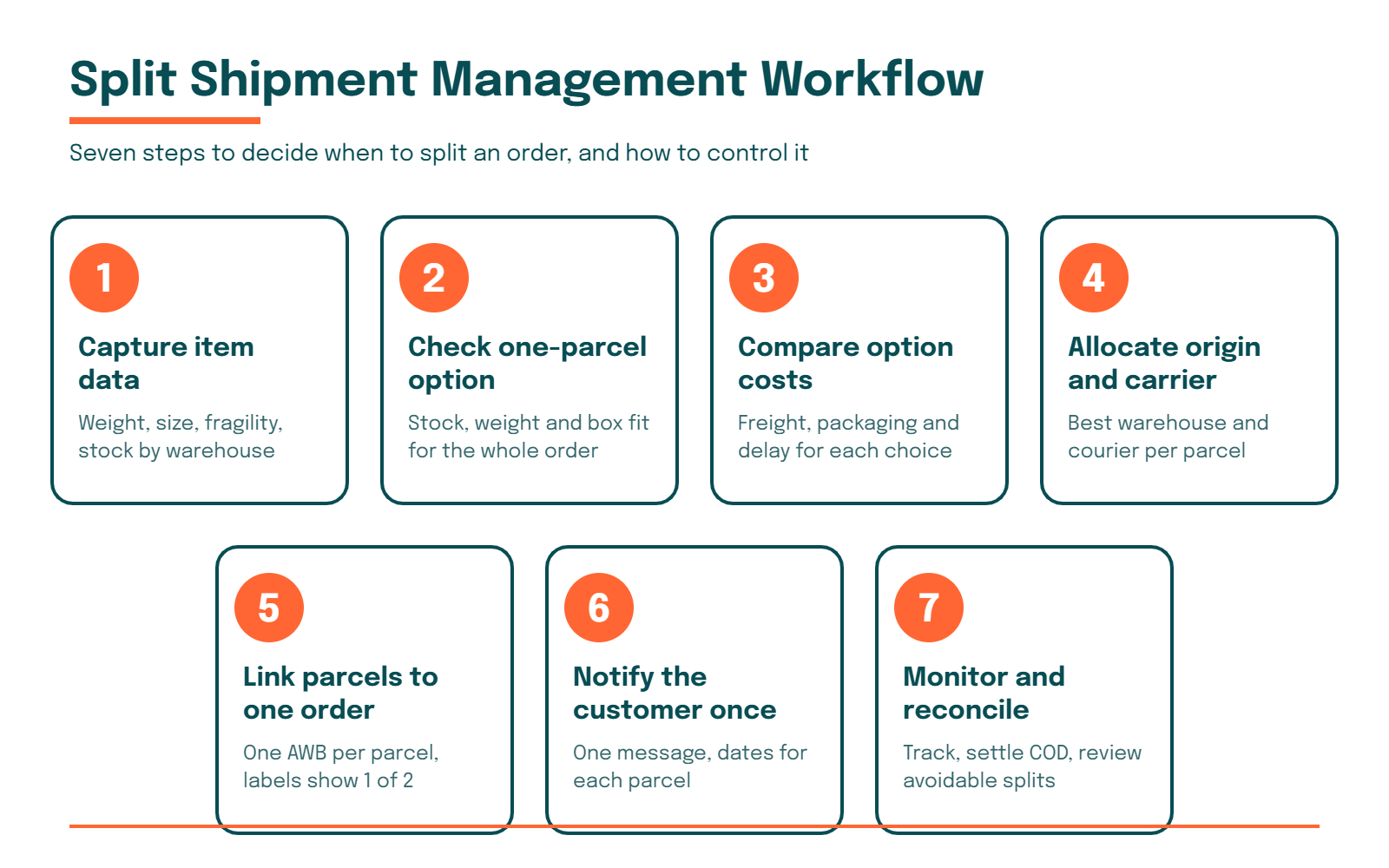
The 7-Step Split Shipment Management Workflow
This workflow works for a brand with a small ops team and a handful of warehouses. You can run it in a spreadsheet at first and move it into software as volume grows.
Step 1: Capture complete item data
Split shipment management starts with data. For every SKU you need weight, packed dimensions, fragility, category and the warehouses where it is stocked. Missing data is the main reason split decisions go wrong.
Fix the master data first. Even a rough weight and size for your top 100 SKUs is better than a blank field.
Step 2: Check if one parcel is possible
Before anything else, test whether the whole order can ship together. Look at stock at a single location, total weight and whether the items can share one box. If yes, the split shipment management decision is already made.
Step 3: Compare the cost of each option
If one parcel is not possible, or not cheapest, price the realistic options. Include freight, packaging and the cost of a delay. Use the rate card for each carrier and zone rather than an average.
A rule such as “split only if the cost increase is under ₹40 or the delivery date improves by two days” is easy to run and easy to explain to your team.
Step 4: Allocate warehouse and carrier per parcel
Each parcel can have its own best origin and its own best carrier. A parcel going to a metro may suit one carrier. A parcel going to a remote pincode may need another. Good split shipment management treats the parcels as separate allocation decisions that share one customer.
Step 5: Link the parcels to one order
Generate one AWB per parcel and keep them linked to the same order ID. Print the parcel count on each label, for example “1 of 2” and “2 of 2”. This helps the warehouse, the carrier and the customer understand that more is coming.
Step 6: Tell the customer once, clearly
Send a single message that says the order is arriving in two parcels, with an expected date for each. Include one tracking view that shows both. Silence is what turns a split shipment into a support ticket.
Step 7: Monitor, reconcile and learn
Track each parcel to delivery, then reconcile freight and COD at order level. Review which splits were avoidable and which were worth it. This feedback loop is what turns split shipment management from a rulebook into a habit.
Ship Together, Split or Hold: Decision Rules
Teams often debate this case by case. Written rules end the debate and speed up dispatch.
| Situation | Ship together | Split now | Hold for completion |
|---|---|---|---|
| All items in one warehouse and one box | Best | Not needed | Not needed |
| One item delayed by two days or less | Good if prepaid | Weak | Often best |
| One item delayed by more than a week | Poor | Best | Not advised |
| High-value item with fragile add-on | Pack carefully | Good | Weak |
| COD order with one slow item | Good | Risky, two COD attempts | Often best |
| Items from two warehouses, one metro address | Possible with transfer | Good | Depends on speed promise |
Use this table as a starting point and adjust it to your categories. The COD row deserves attention. Two COD parcels mean two collection attempts and two remittance lines, which makes split shipment management harder for finance as well as for operations.
For prepaid orders, speed usually wins. The customer has paid, and receiving most of the order early feels better than waiting for all of it. For COD orders, fewer parcels usually win because every extra attempt adds risk.
Split Shipment Management Across Different Order Types
The right rule changes with the type of order. A single policy for everything is easy to write but expensive to live with.
Prepaid single-warehouse orders are the simplest. Ship together whenever one box can hold the items safely, and split only for fragile or oversized goods. These orders rarely need manual review.
Multi-warehouse orders need a cost check. If a stock transfer between warehouses takes a day and costs less than a second parcel, consolidating is often cheaper. If the transfer takes a week, shipping from two origins is usually the better call for the customer.
Gift and multi-address orders split by design. Here split shipment management is about clarity, so make sure each recipient gets the right tracking link and the buyer sees the status of every parcel.
High-value orders deserve extra care. Splitting a laptop from its accessories means two proof-of-delivery events and two chances for a dispute. Many teams keep high-value items together or insist on signature-based delivery for each part.
A simple way to start is to tag every order with its type at checkout. Once each order carries a tag such as prepaid, COD, gift or high-value, your rules can read the tag and act without a person reading every cart. Over a few weeks you will see which tags produce the most splits, and that tells you where to spend your effort first.
Review these categories every quarter. As your catalogue and warehouse network change, the best rule for each order type will change with them.
Prevention Checklist for Split Shipment Management
The cheapest split is the one you avoid. Work through this list before you invest in new tools.
- Place fast-moving SKUs that are bought together in the same warehouse.
- Use location-aware stock logic at checkout so carts do not mix distant stock.
- Keep accurate weight and packed dimensions for every SKU.
- Set a “wait or split” rule for partial stock-outs and write it down.
- Cap how many parcels one order may produce without manual approval.
- Treat COD orders with stricter splitting rules than prepaid orders.
- Add the parcel count to labels and to the customer message.
- Review the top ten SKU pairs that cause splits each month.
Items one and two prevent splits. Items three to six control them. Items seven and eight protect the customer experience and improve the system over time.
Common Split Shipment Management Mistakes
Brands tend to repeat the same errors. Most are cheap to fix.
Letting the system decide by default. Many order tools ship whatever is in stock at the first location. That is convenient, but it ignores cost. Add a rule that checks the options before dispatch.
Ignoring the customer message. A parcel arriving alone with no explanation looks like a mistake. A short notice sent at dispatch prevents most “where is the rest of my order” contacts.
Splitting COD orders freely. Two COD parcels double the cash collection risk. If the second parcel is refused, you may also lose the sale on the first.
Using average shipping cost. Averages hide zone and slab effects. Compare actual rate cards per parcel.
Skipping reconciliation. If you invoice and reconcile at parcel level only, you cannot see what one order really cost. Roll costs up to the order.
Treating every split as a failure. Some splits are the right call. A bulky item that would push a parcel into a much higher slab is a good example. Split shipment management is about choosing well, not about never splitting.
KPIs for Split Shipment Management
You cannot improve what you do not measure. Start with these six numbers and review them monthly.
| KPI | How to calculate it | Why it matters |
|---|---|---|
| Split rate | Orders with more than one parcel ÷ total orders | Shows how common splitting is |
| Parcels per order | Total parcels ÷ total orders | Shows the scale of the extra load |
| Extra freight per split order | Freight on split orders minus the estimate for one parcel | Puts a price on the splits |
| Time to complete order | Last delivery date minus first delivery date | Shows what the customer feels |
| Support contacts per split order | Split-order tickets ÷ split orders | Reveals communication gaps |
| Avoidable split share | Splits caused by stock placement or missing rules ÷ all splits | Shows where to improve first |
Target the avoidable split share first. If most splits come from stock placement, the fix is in inventory, not in logistics. If they come from partial stock-outs, the fix is a clearer wait-or-split rule.
Set a baseline for one month before you try to change anything. A drop in parcels per order is only meaningful if you know where you started.
How eShipz Supports Split Shipment Management
Good rules need a system that can apply them to every order. eShipz is a shipping automation platform that connects your store and warehouse systems to multiple carriers in one place. That gives you the building blocks for split shipment management without stitching together separate tools.
With carrier allocation rules, you can decide per parcel which courier gets the shipment, based on pincode, weight, order type or service level. This supports Step 4 of the workflow. Because each parcel is its own allocation, the choice can differ for each part of the same order.
Tracking and notifications support Step 6. A branded tracking page and automated updates let the customer follow each parcel without contacting support. If a parcel hits a failed delivery, NDR workflows help the team act quickly instead of waiting for a complaint.
Reports and freight checks support Step 7. When you can see cost and delivery status by order and by parcel, you can measure the KPIs above rather than estimate them.
If you are comparing platforms, start from the eShipz platform overview and map each step of your split shipment management workflow to a feature. Confirm that the feature fits your volume, carriers and integrations before you commit.
Conclusion
Splitting an order is sometimes smart and sometimes expensive. What separates the two is whether you chose it. Split shipment management gives you the data, the rules and the customer communication to make that choice order by order.
Start small. Write your wait-or-split rule, fix the weight data for your top SKUs and add the parcel count to your labels. Then measure the split rate and parcels per order for a month.
Once the baseline is clear, tighten the rules, improve stock placement and automate the allocation. Done well, split shipment management lowers cost, protects delivery promises and keeps customers informed.
FAQs About Split Shipment Management
What is split shipment management?
Split shipment management is the process of deciding when an order should leave in more than one parcel, and then controlling origin, carrier, labels and customer communication for each parcel. It turns splitting from an accident into a rule-based choice. The goal is lower cost and clearer delivery promises.
Does a split shipment always cost more?
No. Most splits add freight and packaging, but a bulky item can make separate parcels cheaper than one oversized parcel. Compare the cost of each option before dispatch. In the illustrative example above, a three-way split cost 54% more.
Should I split COD orders?
Be careful. Two COD parcels mean two collection attempts and two remittance lines, which raises risk and reconciliation effort. Many brands hold COD orders for completion unless the delay is long.
How do I tell customers about a split shipment?
Send one message at dispatch that says how many parcels are coming and the expected date for each. Add one tracking link that shows all parcels. Clear communication prevents most support contacts.
How many AWBs does a split order need?
Each parcel needs its own AWB. Link all AWBs to the same order ID so your team and your customer can see the full order. Printing the parcel count, such as “1 of 2”, on each label helps.
Which KPIs show if split shipment management is working?
Track split rate, parcels per order, extra freight per split order, time to complete the order and support contacts per split order. The avoidable split share tells you where to improve first. Review them monthly against a baseline.
Can small brands run split shipment management without software?
Yes, at low volume. A spreadsheet with SKU weights, warehouse stock and a simple decision table is enough to start. As order volume and warehouse count grow, automation becomes worth the investment.