





A parcel network can be heavily automated and still lose money to the humans around it. In its 2026 parcel logistics study, Boston Consulting Group found that only roughly one in five carriers runs highly or fully automated primary sortation centers, with most still relying on manual or semi-mechanized processes (BCG, How Cost Intelligence Is Reshaping Parcel Logistics, February 2026). The same gap exists on the seller side, between the moment an order is placed and the moment a parcel leaves the dock.
This guide explains zero touch shipping in plain terms. It covers what the term means, where manual touches hide, how the workflow runs, and how eShipz supports each step for ecommerce brands.
If your team still picks couriers by hand, prints labels one at a time, and chases tracking links all day, this model is worth a close look.
What Is Zero Touch Shipping?
Zero touch shipping is a way of running outbound logistics so that a normal order moves from checkout to doorstep without a person handling any shipping step. Rules choose the courier, software creates the label, the pickup is booked automatically, and tracking updates reach the customer on their own.
People do not disappear in zero touch shipping. They move from doing the work to setting the rules and handling real exceptions.
Think of it as management by exception. If 95 orders out of 100 follow the rules, nobody should touch them, and the team should spend its time on the five that do not.
Zero touch shipping vs. basic shipping automation
Basic automation removes one task, such as bulk label printing. A zero touch setup links every task into one chain, so the output of one step triggers the next without a click.
That chain is what makes the model work at scale, and it is also why it needs a platform that connects stores, couriers, and customers in one place.
| Level | How orders move | Where people still step in |
|---|---|---|
| Manual shipping | Staff copy orders into courier portals one by one | Every step: courier choice, label, pickup, tracking, returns |
| Partly automated shipping | Bulk label printing or a single courier integration | Courier choice, pickup booking, exception follow-up |
| Zero touch | Rules and APIs run the full chain for standard orders | Rule changes and true exceptions only |
Why Manual Touches Quietly Drain a Shipping Operation
Every manual touch costs minutes, and every minute repeats on every order. A step that looks cheap at 20 orders a day becomes a full-time job at 500.
Manual touches also create errors. A wrong pincode, a mismatched label, or an overlooked failed delivery can turn a sold item into a return.
The table below lists where those touches usually live and what a zero touch shipping setup does about each one.
| Manual touch | What goes wrong | Zero touch replacement |
|---|---|---|
| Choosing a courier per order | Slow decisions, inconsistent cost and speed | Rule-based or AI courier allocation |
| Typing order data into portals | Typos, duplicate entries, wrong addresses | API sync from the store or ERP |
| Printing and correcting labels | Rejected pickups and delayed dispatch | Automatic label and invoice generation |
| Booking pickups and manifests | Missed pickups and unclear handover records | Automatic pickup and manifest flow |
| Checking tracking links | Late reaction to delays | Automated tracking and exception alerts |
| Calling customers about failed deliveries | Slow reattempts and higher return rates | Automated NDR workflow |
| Handling return requests | Manual label creation and courier booking | Automated return label and pickup flow |
The Hidden Cost of Hands-On Shipping
The chart below shows where staff time tends to go in a fully manual workflow. The minutes are illustrative, built to show the shape of the problem rather than to quote a benchmark.
In this example, the biggest drains are not label printing. They are the follow-up tasks: tracking chases and customer calls after a failed delivery.
Follow-up work is where the model pays back first, because those tasks are triggered by events that software can watch around the clock.
A simple way to size your own savings
Take your monthly order count, multiply it by the manual minutes per order in your team, and multiply by the loaded cost of a minute of staff time. That is the monthly cost of touching orders that the platform could handle.
The model below uses hypothetical numbers. Replace them with your own before drawing conclusions.
| Input (hypothetical) | Value | Result |
|---|---|---|
| Monthly orders | 10,000 | – |
| Manual minutes per order, all steps | 5 | 50,000 minutes, about 833 hours |
| Loaded cost per staff hour | Rs 200 | Rs 1,66,600 per month |
| Share of orders that follow standard rules | 90% | 9,000 orders can run with no touch |
| Staff time freed in this example | 90% of 833 hours | About 750 hours per month |
This is an illustrative calculation, not a promise. Real savings depend on how many of your orders fit clean rules.
How Zero Touch Shipping Works Step by Step
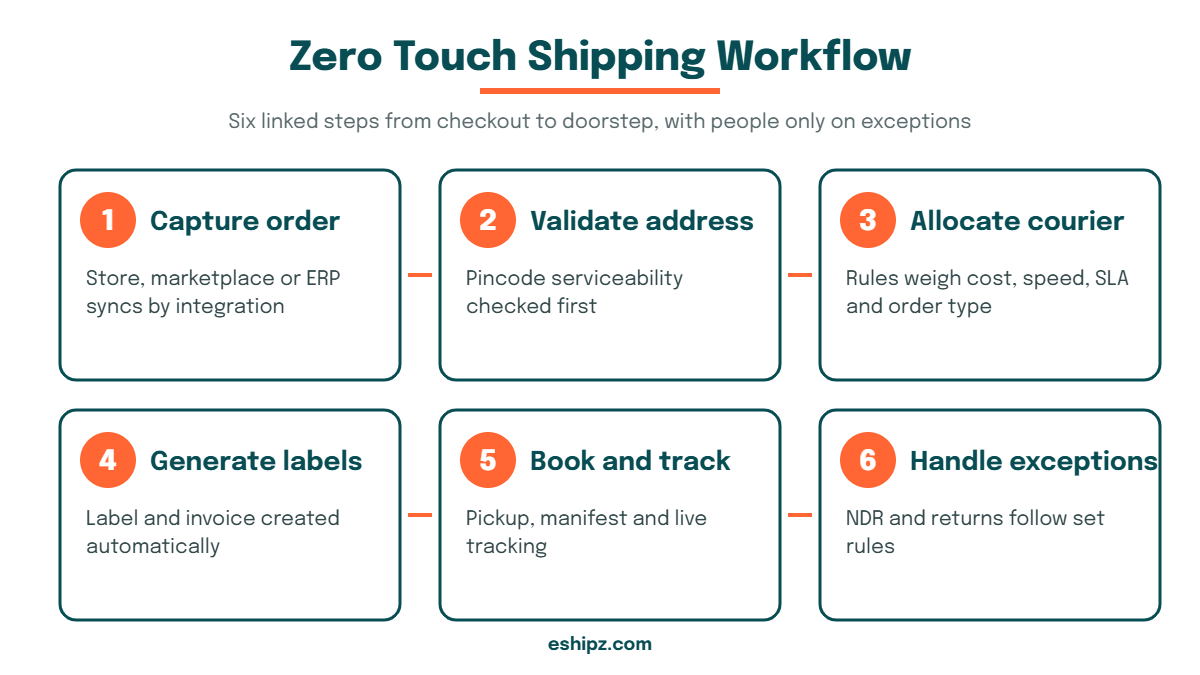
A zero touch shipping workflow has six links. Each one hands off to the next without a person in between.
Step 1: Capture the order automatically
The order flows from your store, marketplace, or ERP into the shipping platform through an integration. Nobody copies data across screens.
Step 2: Validate the address and serviceability
The platform checks that the pincode is serviceable before a courier is assigned. Bad addresses are flagged early instead of failing in transit.
Step 3: Allocate the courier by rule
Allocation rules weigh cost, speed, carrier performance, and order type, such as COD, express, fragile, or bulky. The best courier is selected for each order in seconds.
Step 4: Generate labels and documents
Labels and invoices are created the moment a courier is assigned. They are ready for the warehouse without a separate print-and-fix step.
Step 5: Book pickups and track the parcel
Pickups and manifests follow automatically, and live status flows back from every courier into one view. Customers receive updates without staff sending them.
Step 6: Resolve exceptions and returns
Failed deliveries start an automated NDR workflow, and return requests create their own labels and pickups. A person is pulled in only when the rules run out.
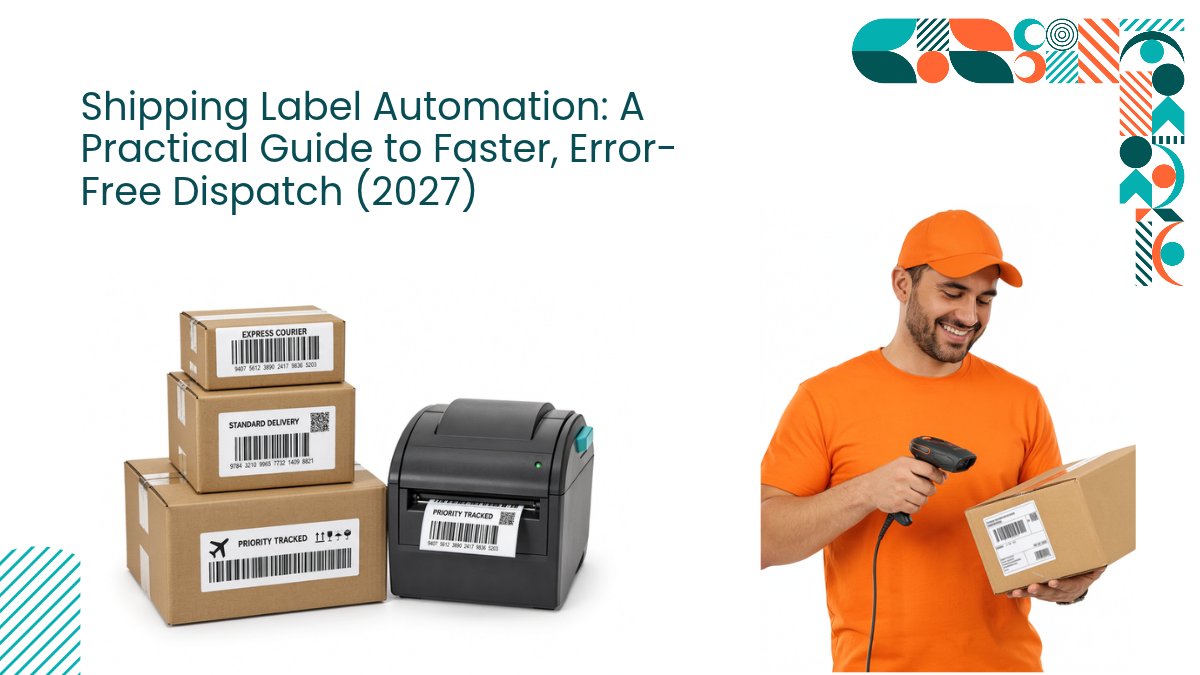
For a deeper look at the label link specifically, read our guide to shipping label automation, which covers how to avoid rejected pickups.
Manual vs. Semi-Automated vs. Zero Touch Shipping
Comparing the three models side by side makes the trade-offs clear. The right choice depends on order volume and how repeatable your orders are.
| Factor | Manual | Semi-automated | Zero touch |
|---|---|---|---|
| Courier choice | Staff decide per order | One default courier | Rules or AI choose per order |
| Label creation | Portal by portal | Bulk print | Automatic on allocation |
| Tracking | Checked by hand | Single-courier view | One view across carriers |
| Failed deliveries | Phone calls and spreadsheets | Courier-led follow-up | Automated NDR workflow |
| Returns | Email and manual booking | Partial | Automated return flow |
| Scales with volume | Needs more staff | Needs some staff | Needs rule upkeep |
| Error risk | High | Medium | Low for standard orders |
What You Need Before Going Zero Touch
The model works best when the basics are clean. Software cannot fix a messy catalog or unclear policies, it can only repeat them faster.
Use this checklist to test your readiness.
- Clean order data: complete addresses, phone numbers, weights, and dimensions on every SKU.
- Written allocation rules: which courier handles COD, express, fragile, and bulky orders, and in which zones.
- Connected channels: your store, marketplace, and ERP feed one platform through integrations.
- Defined exception owners: a named person or team for each type of exception.
- Clear return policy: windows, reasons, and who pays, so return flows can run on rules.
- Agreed service targets: delivery times and success rates you will measure against.
Where Zero Touch Shipping Fits Best
The model suits brands with high order volume, repeatable products, and several couriers. It also suits teams where manual effort is the main thing that stops them from growing.
It is less suited to one-off oversized freight or highly customized orders. Those still need a human, which is why the exception path matters as much as the automated one.
Zero touch shipping for ecommerce brands
Ecommerce orders are small, frequent, and similar, which makes them ideal for rule-based handling. Festive sales and flash campaigns multiply volume overnight, and rules scale without extra hiring.
Zero touch shipping for multi-warehouse and enterprise teams
Teams with several warehouses and ERP, WMS, or TMS systems gain from one shipping layer that routes orders and syncs data. The goal is the same: no re-keying and no hidden steps.
How eShipz Supports Zero Touch Shipping
eShipz is a logistics automation platform built around connecting every carrier and every shipping step. Its public product pages describe the capabilities below, which map directly onto the six links of the workflow.
| Workflow step | What eShipz offers | Why it matters |
|---|---|---|
| Order capture | Integrations with Shopify, WooCommerce, Magento, marketplaces, and ERP, TMS, and WMS systems | Orders arrive with no re-keying |
| Courier allocation | AI courier allocation using cost, delivery speed, SLA, and serviceability, with rules for zones, COD, express, fragile, and bulk orders | The right courier is chosen on every order |
| Labels and documents | Automatic label and invoice generation through one multi-courier shipping API | No print-and-fix step |
| Tracking | One tracking view across carriers with delay and exception alerts and customer notifications | Status reaches teams and customers on its own |
| Failed deliveries | AI NDR workflow | Exceptions are worked by rules first |
| Returns | Automated return label generation, courier selection, and pickups | Returns run without email chains |
| Proof and cost control | IntelliProof real-time ePOD and freight audit software | Delivery proof and billing checks stay in one stack |
The platform page also lists carrier integrations such as Delhivery, Blue Dart, FedEx, Amazon Shipping, SafeExpress, and Gati inside one courier management view. Check the live carrier list on the site for your lanes before you commit.
Why one platform beats a patchwork
The model breaks if one link in the chain needs a manual hand-off. A single platform keeps allocation, labels, tracking, NDR, and returns on the same data, so one step can trigger the next.
That is why eShipz positions its stack as logistics automation rather than a single feature, and why it fits this goal well. Visit the logistics automation page to see the full stack.
Top 5 Platforms to Evaluate for Zero Touch Shipping
No tool suits every brand, so test any shortlist against your own rules and volumes. The platforms below are a starting point for an evaluation, listed with eShipz first.
| Platform | Where it is commonly used | What to verify |
|---|---|---|
| eShipz | Multi-carrier shipping automation, courier allocation, NDR, returns, ePOD, and freight audit | Carrier coverage on your lanes and rule depth |
| Shiprocket | Courier aggregation for Indian sellers | Rule-based allocation and exception automation |
| ClickPost | Tracking, NDR, and post-purchase experience | Courier allocation and label depth |
| ShipStation | Shipping software used widely by sellers in the US | India carrier coverage and COD handling |
| Shipway | Tracking and post-shipment workflows | End-to-end allocation and returns coverage |
Descriptions of other platforms above are general and should be confirmed on each vendor site. The order shown is not a ranking.
Common Mistakes When Moving to Zero Touch Shipping
Most failed rollouts come from rushing the rules or ignoring exceptions. These are the mistakes to avoid.
- Automating bad data. Wrong weights and addresses simply fail faster, so clean your catalog first.
- Starting with every rule at once. Begin with your most common order type and add rules in stages.
- Ignoring the exception path. If nobody owns exceptions, they pile up unseen.
- Skipping a pilot. Run one warehouse or one product line first, then expand.
- Never reviewing rules. Courier performance changes, so check allocation rules every month.
- Measuring nothing. Without baseline numbers you cannot prove the change worked.
KPIs to Track for Zero Touch Shipping
What gets measured gets managed. Track these indicators before and after launch, and review them weekly during the pilot.
| KPI | What it tells you | Direction you want |
|---|---|---|
| Touchless order rate | Share of orders that ship with no human step | Up |
| Order-to-dispatch time | Speed from checkout to handover | Down |
| First-attempt delivery rate | How often delivery succeeds on the first try | Up |
| NDR resolution time | Speed of reattempt decisions | Down |
| Return-to-origin rate | Share of parcels sent back undelivered | Down |
| Cost per shipment | Freight cost after allocation rules | Down |
| Manual minutes per order | Remaining human effort | Down |
A Practical 30-Day Rollout Plan
A staged rollout lowers risk and builds trust in the rules. This plan is a suggestion, so adjust it to your volumes.
- Week 1: record your baseline minutes per order, delivery success, and return rate, and clean the catalog data.
- Week 2: connect your store and carriers, then write allocation rules for your most common order type.
- Week 3: pilot on one warehouse or product line, and review every exception with the team.
- Week 4: refine the rules, add the next order type, and compare the KPIs against your baseline.
After the pilot, extend the model to the rest of your catalog, one rule set at a time.
An Illustrative Day: Before and After
Picture a hypothetical apparel brand that ships 400 orders a day from one warehouse. These numbers are invented to show the workflow, not results from a real customer.
Before automation, two people spend the morning copying orders into courier portals and printing labels. By noon they start chasing tracking links, and the afternoon goes to phone calls about failed deliveries.
After a staged rollout, the same orders arrive in the platform on their own. Labels are ready when the warehouse opens, and the two people review a short exception list instead of the full order book.
| Moment in the day | Before (hypothetical) | After (hypothetical) |
|---|---|---|
| Start of shift | Orders copied into portals by hand | Orders already allocated and labeled |
| Midday | Pickups booked courier by courier | Pickups and manifests created automatically |
| Afternoon | Tracking chased link by link | Alerts raised only for delayed parcels |
| End of day | Failed deliveries called one at a time | NDR cases already in a review queue |
The brand ships the same number of parcels. What changes is that people spend their hours on judgment instead of repetition.
Control, Visibility and Trust in an Automated Flow
Teams often worry that removing manual steps means losing control. In practice, control moves from the individual order to the rule that governs thousands of orders.
That shift makes visibility the most important feature. If you cannot see what the rules did, you cannot trust them.
- Audit trail: every allocation should show which rule fired and why.
- Exception dashboards: late, stuck, and failed parcels should surface without a search.
- Carrier scorecards: delivery success and speed by route show when a rule needs a change.
- Override path: a person must be able to reassign a courier in one step when a case needs it.
Build these checks into your pilot. A rule you can inspect is a rule you can improve.
Keep a short change log for your rules. When a delivery metric moves, you can then trace it back to the rule or courier change that caused it, instead of guessing.
Review the log with operations and customer support together. Support teams hear problems first, and their notes often point to the next rule worth writing.
Conclusion
Zero touch shipping turns shipping from a daily chore into a rule-driven system. Orders flow from checkout to doorstep, and your team handles only the cases that truly need judgment.
The model needs clean data, written rules, and a platform that joins every step. eShipz brings allocation, labels, tracking, NDR, returns, and proof of delivery into one stack, which makes it a strong fit for the model.
Ready to see it on your own orders? Book a demo on the eShipz website and map your first rule set.
Frequently Asked Questions About Zero Touch Shipping
What is zero touch shipping?
Zero touch shipping is a model where a standard order moves from checkout to delivery with no manual shipping step. Rules and software handle courier choice, labels, pickups, tracking, and updates.
Does zero touch shipping mean no staff are needed?
No. Staff move from repetitive tasks to setting rules and handling exceptions. Real exceptions, such as damaged goods or unusual addresses, still need a person.
Which orders suit zero touch shipping best?
Standard, repeatable orders suit it best. Examples are regular parcels with complete addresses, known weights, and normal COD or prepaid terms.
How does zero touch shipping reduce costs?
It removes repeat manual minutes and cuts errors that cause failed pickups. Rule-based courier choice also keeps freight cost consistent across orders.
Can small sellers use zero touch shipping?
Yes, once order volume and rules are stable enough to repeat. A small seller can begin with one rule set, such as the default courier for each zone.
What features should a zero touch shipping platform have?
Look for store and ERP integrations, multi-courier access, rule-based allocation, automatic labels, tracking, an NDR workflow, and returns automation. Confirm each on the vendor site.
How does eShipz support zero touch shipping?
eShipz provides a multi-courier shipping API, AI courier allocation, automatic labels, unified tracking, an AI NDR workflow, returns automation, and ePOD. Confirm current details on the eShipz site or with the team.