








Every parcel starts its journey with a sticker. When that sticker is wrong, even a perfect product and a reliable courier cannot save the order. Shipping label errors quietly turn into rejected pickups, hub exceptions and returns.
The standards body GS1 treats the label as the link between a physical parcel and the data that describes it. Its GS1 Logistic Label Guideline (Release 1.3) says scanning the code on the label connects the unit to the electronic messages about it. If the code will not scan, that link breaks.
This guide explains the most common shipping label errors, what they cost, and a six-step workflow to remove them. You will also get a prevention checklist, a KPI table and seven answers to questions sellers ask most. The cost numbers are illustrative, so swap in your own rates.
If you want fewer manual steps overall, you can also look at how a multi-carrier shipping platform generates labels from order data instead of typed data.
What Are Shipping Label Errors?
Shipping label errors are any mistakes on a parcel label that stop a courier from reading, routing or delivering the parcel as planned. They include wrong or incomplete addresses, unreadable barcodes, mismatched weights, missing order references and labels placed on the wrong spot of the box.
Some of these mistakes are visible to a person. Others, such as a barcode with too little white space around it, look fine to the eye but fail at the scanner.
Where Shipping Label Errors Happen
Shipping label errors enter the process at three points: when order data is captured, when the label is generated, and when the label is printed and stuck on the parcel. Each point needs its own control.
Think of the three points as gates. A parcel that clears all three gates has a very low chance of an exception, while a parcel that skips one gate carries the risk forward to the next team.
Order data errors come from checkout forms and marketplace imports. Generation errors come from wrong carrier mapping or wrong service codes. Print errors come from low-quality printers, wrong label size and poor placement.
What a Good Label Must Contain
The GS1 Logistic Label Guideline (Release 1.3) describes a label in three parts: supplier information, customer information and carrier information. It says the carrier part holds the ship-to postal code and routing details. It also says the part with the unit identifier should sit beneath the others.
For a parcel seller, this translates into a simple rule. The label must show who it is going to, where it is going, how it will travel and which order it belongs to, with a barcode that scans on the first try.
The guideline also gives print specifications for the barcode. These numbers are useful when you audit your own printer output:
| Print specification | Value in the GS1 guideline |
|---|---|
| Minimum bar height (excluding text) | 31.75 mm (1.250 inches) |
| Quiet zone on each side of the barcode | At least 10 X-dimensions |
| X-dimension range | 0.495 mm to 0.94 mm, target 0.495 mm |
| Barcode distance from edge on cartons | At least 19 mm (0.75 inch) from any vertical edge |
| Barcode height from natural base on cartons | Target of 32 mm (1.25 inches) |
| Human-readable text height | At least 3 mm |
| Orientation on logistic units | Horizontal, known as picket fence |
These values describe pallet and carton labels in the GS1 system. Your courier may publish its own label rules, so always check the courier’s specification first and treat the GS1 numbers as a reference for good practice.
Common Causes of Shipping Label Errors
Most shipping label errors trace back to a handful of root causes. Sorting your errors by cause tells you which fix will remove the most problems.
| Cause | What goes wrong | Typical symptom | First fix |
|---|---|---|---|
| Incomplete or wrong address | Missing landmark, wrong pincode, mixed-up city and state | Courier cannot route the parcel; failed delivery | Validate the address at checkout |
| Barcode will not scan | Low print contrast, blurry thermal print, little white space | Hub scanner rejects the parcel | Test print and scan before every batch |
| Wrong label size | Label is cut or scaled to fit a different paper size | Edges and codes are cropped | Match the label template to the roll size |
| Wrong weight or dimensions | Declared weight differs from the actual parcel | Billing disputes and rerouting | Weigh at packing and store the value |
| Duplicate or reused AWB | Same waybill number printed for two parcels | Tracking shows another customer’s parcel | Lock each waybill to one order |
| Wrong courier or service | Label made for one courier is stuck on another’s parcel | Pickup agent refuses or hub misroutes | Generate labels only after carrier allocation |
| Payment mode mismatch | Cash on delivery amount missing or wrong | Delivery agent collects the wrong amount | Pull the amount from the order system |
| Damaged or covered label | Tape over the barcode, smudged ink, label on a seam | Scan fails in transit | Fix a standard label position on the box |
Address Fields Cause Most Daily Rework
A label is only as good as the data behind it. If a customer types a landmark into the wrong field, the label inherits the mistake. Good shipping address validation before label creation prevents a whole class of shipping label errors.
Teams that fix addresses after dispatch pay twice: once for the first attempt and once for the second. A short confirmation message to the customer, sent before the label is printed, is a low-cost way to catch a wrong address.
Print Quality Is a Quiet Source of Failures
Thermal printers wear out. Print heads collect dust, ribbons fade and rolls slip. Each of these produces faults that look minor on the packing bench but cause scan failures at a hub.
A weekly test print, scanned with the same type of scanner couriers use, is the cheapest control in this whole guide.
What Shipping Label Errors Cost Your Business
The cost of a label mistake depends on when you catch it. The earlier the catch, the cheaper the fix. A reprint at the packing bench costs a few rupees, while a parcel that fails delivery costs a return trip, a reship and an unhappy customer.
The chart below uses illustrative numbers for a hypothetical seller. It shows how fast the cost per parcel grows as an error travels further.
Now apply those unit costs to a hypothetical month. The model below assumes 30,000 orders and a 2 percent error rate, which gives 600 affected labels. These are assumptions for illustration, not industry benchmarks.
| Stage where error is caught | Affected labels (illustrative) | Cost per label (Rs) | Monthly cost (Rs) |
|---|---|---|---|
| At packing | 360 | 5 | 1,800 |
| At pickup | 150 | 45 | 6,750 |
| In transit | 60 | 110 | 6,600 |
| After a failed delivery | 30 | 260 | 7,800 |
| Total | 600 | 38 average | 22,950 |
In this model, catching every error at packing would cost 3,000 rupees instead of 22,950. The gap of 19,950 rupees a month is the prize for fixing the problem at the source.
Hidden Costs Beyond the Rupee Figure
Shipping label errors also consume support time, delay cash on delivery remittance and damage repeat purchase intent. These costs are real but harder to measure, so track them through support tickets tagged to label issues.
Cash flow is affected as well. Parcels held up by label problems delay delivery, and delayed delivery delays cash on delivery remittance.
Courier relationships suffer too. A seller whose parcels often fail scans becomes a low-priority account at pickup time.
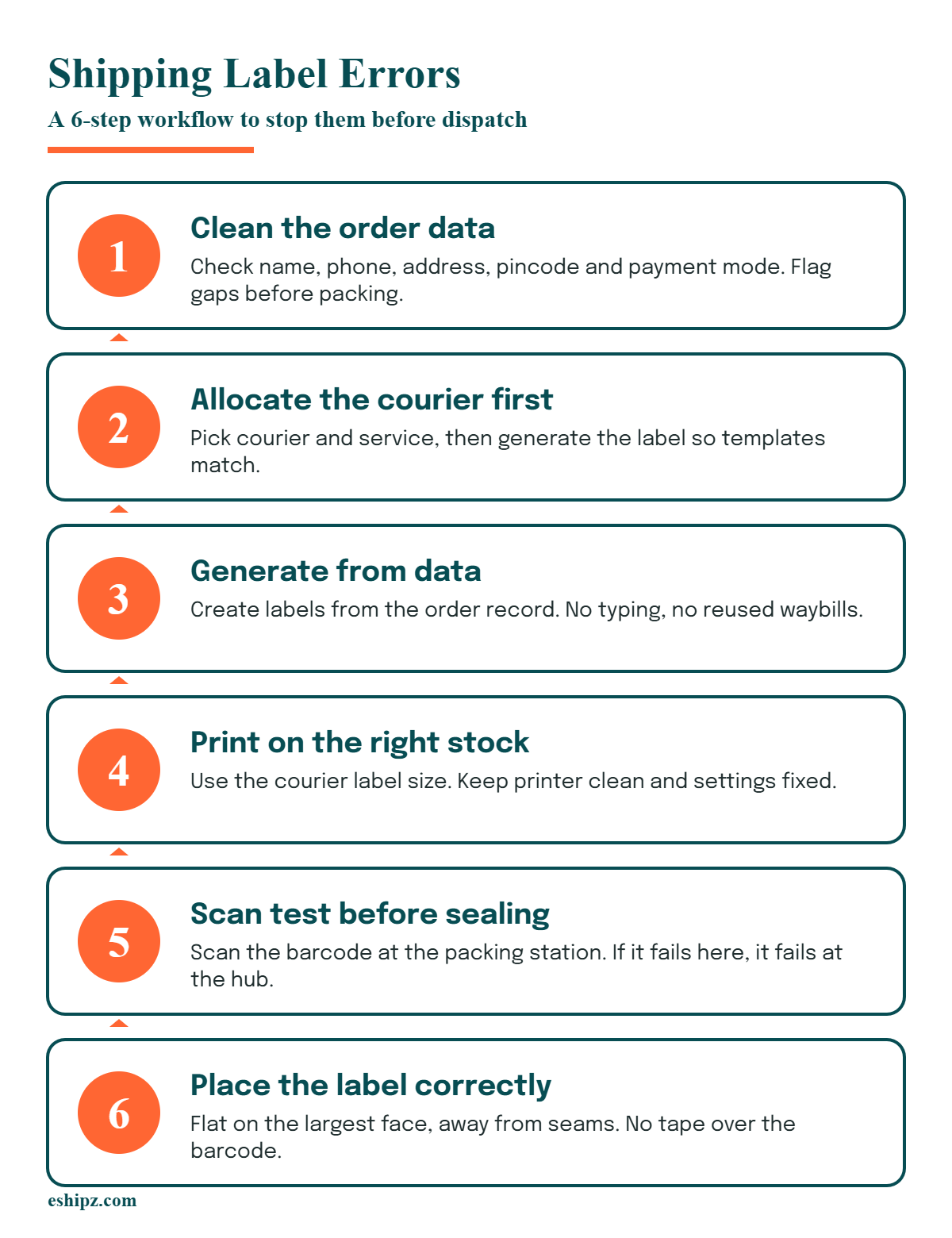
How to Fix Shipping Label Errors: A 6-Step Workflow
Use this workflow to remove shipping label errors in a repeatable way. Each step has an owner and a pass or fail check, so errors stop at the earliest possible point.
Step 1: Clean the Order Data
Check name, phone, address, pincode and payment mode when the order arrives. Reject or flag orders with missing fields before they reach the packing bench.
This single step prevents the largest share of shipping label errors, because every later step copies the data forward.
Step 2: Allocate the Courier Before Printing
Decide the courier and service first, then generate the label. A label printed before allocation often has to be thrown away when the order is moved to a different carrier.
Step 3: Generate the Label From Data, Not From Typing
Create labels from the order record through an integration. Hand-typed labels invite typos, duplicate waybills and wrong service codes.
Step 4: Print on the Right Stock and Size
Use the label size the courier template expects. Keep the printer clean and set a default print profile so every operator prints the same way.
Step 5: Scan Test Before Packing Closes
Scan the printed barcode at the packing station. A label that does not scan on the bench will not scan at the hub.
Step 6: Place the Label in a Standard Position
Stick the label flat on the largest face of the box, away from seams, edges and tape lines. Do not cover the barcode with transparent tape that causes glare.
Document the workflow in one page and train every new packer on it in the first week. Training once and relying on memory does not hold during busy periods, so keep the page at the packing station.
Track exceptions weekly. If the same cause keeps appearing in your log of shipping label errors, change the upstream control instead of retraining staff again.
Manual vs Automated Label Generation
Manual label work is workable at ten orders a day. At a few hundred it becomes the main source of mistakes. The comparison below shows where automation changes the picture.
| Factor | Manual labels | Automated labels |
|---|---|---|
| Data entry | Typed or pasted by an operator | Pulled from the order record |
| Courier format | Operator picks the template | Template follows the allocated courier |
| Waybill numbers | Risk of reuse or typos | Assigned and locked to one order |
| Bulk printing | Slow, one parcel at a time | Batch print for a whole pick list |
| Error visibility | Found after a failed scan or delivery | Flagged at the time of creation |
| Audit trail | Little or none | Every label linked to an order and a time |
The biggest gain from automation is consistency. Every operator produces the same label in the same way, so quality no longer depends on who is on shift.
Automation does not remove the need for a clean address or a healthy printer. It removes the typing and template errors, which leaves your team free to focus on data quality and print checks.
Who Owns Each Control for Shipping Label Errors
Controls only work when someone owns them. In many teams, label problems bounce between operations, customer support and the courier desk, and nobody fixes the root cause.
Assign one owner per control, and give each owner a weekly number to report. The table below is a simple starting point that you can adapt to your team size.
| Control | Suggested owner | Weekly check |
|---|---|---|
| Address and pincode validation | Order management lead | Share of orders flagged and fixed before dispatch |
| Courier allocation before printing | Logistics manager | Labels reprinted because the courier changed |
| Printer maintenance and test scans | Warehouse supervisor | Scan failures found at the packing bench |
| Label placement on the box | Packing station lead | Photos of five random parcels per shift |
| Exception log review | Customer support lead | Top three causes and the cost of each |
In a small team, one person can hold several of these roles. What matters is that every row has a name next to it and a number that gets reviewed.
When an owner reports a bad week, look for a change upstream instead of a person to blame. Many shipping label errors disappear once the data, the template and the printer settings are fixed together.
Prevention Checklist for Shipping Label Errors
Print this checklist and keep it at the packing station. Tick each item before the parcel is sealed.
- The address has a valid pincode, a full street line and a working phone number.
- The payment mode and cash on delivery amount match the order.
- The courier and service on the label match the courier assigned to the order.
- The waybill number is unique and linked to this order only.
- The label is printed at the right size with a clear, dark barcode.
- A test scan of the barcode succeeded at the packing station.
- The label sits flat on the largest face of the box, away from seams.
- Tape does not cover the barcode or the address block.
Review this list monthly. Remove items that never fail and add items that match your own pattern of failures.
Mistakes That Keep Shipping Label Errors Alive
Teams often invest effort in the wrong place. These mistakes appear again and again when sellers audit their label problems.
Fixing Errors Without Logging Them
If operators correct a label and move on, nobody learns which cause is most common. Log each fix with a reason code so the pattern becomes visible.
Blaming the Courier First
Couriers do cause some failures, but many exceptions start with seller data. Check your own label and address before raising a dispute.
Skipping the Scan Test
Sellers assume a label that looks clear will scan. The scanner is the only judge, so test it every batch.
Printing Labels Too Early
Printing labels hours before pickup invites changes. Orders get edited, addresses get corrected and couriers get reassigned, and the printed label becomes wrong.
Ignoring Small Print Issues
Faint prints, slightly curled labels and dirty print heads seem harmless. Together they are a steady source of rejected parcels at hubs.
KPIs to Track for Shipping Label Errors
You cannot reduce what you do not measure. Track these indicators weekly and review them against your own baseline, since a good number depends on your product mix and courier network.
| KPI | How to calculate | What it tells you |
|---|---|---|
| Label error rate | Labels with an error divided by total labels printed | Overall health of the process |
| First-scan success rate | Parcels scanned correctly at first pickup scan divided by parcels picked up | Print and barcode quality |
| Address-related failure share | Failed deliveries tagged to address issues divided by all failed deliveries | Quality of order data |
| Reprint rate | Reprinted labels divided by total labels | Waste at the packing bench |
| Pickup rejection rate | Parcels refused at pickup divided by parcels offered | Label and packing compliance |
| Cost of label errors | Sum of reprint, re-pickup and reship cost per month | Money lost to shipping label errors |
Set a target for each KPI only after you have four weeks of baseline data. A target that is too ambitious will be ignored, and a target that is too soft will not change behavior.
Pick two or three of these to start. Review them with your packing and customer support leads in the same weekly meeting.
How eShipz Helps Reduce Shipping Label Errors
eShipz is a shipping automation platform for brands that work with many couriers. According to its website, its AutoShip Hub handles label generation and courier sync, and the site cites 500+ carrier integrations. Please confirm current coverage on the site before relying on a specific carrier.
Because labels come from order data, the platform removes typing from the process. That addresses several causes in the table above, including typos, wrong templates and reused waybills.
Its Track360 module offers real-time tracking and delay alerts, which helps you spot exceptions early. For sellers who want to see the whole workflow, the eShipz homepage lists the modules in detail.
Brands that ship through several couriers feel label problems more, because every courier has its own template and its own rules. A platform that applies the right template for the allocated courier removes one more manual decision from the packing bench.
Whichever tool you use, the principle stays the same. Generate labels from clean data, test the scan and catch exceptions at packing.
Conclusion
Shipping label errors are small mistakes with large downstream costs. A wrong pincode, a faint barcode or a reused waybill can turn a good order into a return.
Start by cleaning order data, generate labels from that data, test every print and track a small set of KPIs. Within a few weeks the log of shipping label errors will show you which control to tighten next.
Frequently Asked Questions About Shipping Label Errors
What are the most common shipping label errors?
The most common shipping label errors are incomplete addresses, unreadable barcodes, wrong label sizes, mismatched weights and reused waybill numbers. Address and print problems cause most daily rework for sellers.
How do I stop barcode scan failures on shipping labels?
Use a clean thermal printer, the correct label size and a dark print setting. Leave enough white space around the barcode and scan a test print before each batch.
Can wrong shipping labels cause return to origin?
Yes. If a label has a wrong address or a code the hub cannot scan, the parcel may fail delivery and travel back to the seller. The earlier you catch a mistake, the cheaper it is to fix.
What size should a shipping label be?
Use the size your courier specifies for its label template. Many sellers use a 4 by 6 inch thermal label, but you should confirm the size with each courier before printing.
Should I print shipping labels in bulk?
Bulk printing saves time, but print only for orders that are final. Orders that may change should wait until the address, courier and payment mode are confirmed.
How often should I audit shipping label errors?
Review your error log weekly and run a deeper audit monthly. Look at the top causes, the cost of each and the controls that stopped working.
Does automation remove all shipping label errors?
No. Automation removes typing, template and waybill errors, but it cannot fix a wrong address typed by a customer or a worn printer. Pair automation with address checks and print tests.