







India’s online shoppers have grown to 290-300 million, and e-retail reached roughly $65-$66 billion in gross merchandise value in 2025, according to Bain & Company’s How India Shops Online 2026. That scale puts pressure on every fulfillment decision, including what to do when one order cannot ship from one place.
Split shipment in ecommerce is that decision in its sharpest form. You can delay the whole order until every item is ready, or you can send what you have now and ship the rest later. Each choice costs money, and each one changes how the customer feels about your brand.
This guide explains how split shipment in ecommerce works, what it really costs, and how to decide order by order. You will get decision rules, a five-step workflow, a checklist, and the KPIs worth tracking. The cost figures in the model are illustrative, and we state every assumption.
What Is Split Shipment in Ecommerce?
Split shipment in ecommerce means fulfilling one customer order through two or more parcels. The parcels can leave from the same warehouse on different days, or from different warehouses at the same time. The customer places one order, pays once, and receives several deliveries.
A split shipment is different from a partial shipment in one respect: intent. A split is a planned routing choice made by your system. A partial shipment is often a forced outcome after a stock shortage.
Sellers meet it in three forms. A multi-node split ships items from different warehouses together. A time split ships available items now and the rest after restocking. A carrier split sends bulky or restricted items with a different courier.
Why does it matter? Because split shipment in ecommerce touches three results at once: your freight bill, your delivery promise, and your support queue. A small change in the split rate moves all three. That is why the topic deserves its own rules instead of ad hoc calls by whoever is on shift.
Why Orders Split: Common Causes
Orders rarely split because someone wants them to. They split because the inventory, the product, or the network forces a choice. Knowing the cause tells you which fix to apply.
| Cause | What happens | Typical fix |
|---|---|---|
| Stock sits in two warehouses | No single node holds the full basket | Inventory pooling or transfer rules |
| One item is out of stock | Rest of the order is ready, one line is not | Backorder rule with a time limit |
| Hazmat or fragile items | Item needs a special carrier or packing | Carrier split by product class |
| Bulky plus small items | One parcel breaks the weight slab or size limit | Parcel-fit logic at pack stage |
| Marketplace seller mix | Items come from different sellers | Seller-level fulfillment tracking |
| Pre-order lines in a mixed cart | Live items wait for a launch date | Customer choice at checkout |
Most teams find that one or two causes drive the majority of their splits, which makes the fix cheaper than expected. Pull a month of orders and tag each split with its cause before you change any rule.
The Real Cost of Split Shipment in Ecommerce
The visible cost of split shipment in ecommerce is the second parcel. The hidden costs sit around it: extra packaging, a second pick and pack, more tracking messages, and more “where is my other item” contacts.
There is also a cost on the other side. Holding an order for stock transfer adds delay, and delay raises cancellation risk and support load. A good decision compares both sides instead of assuming splitting is always the expensive option.
The model below is illustrative. It uses one three-item order in one shipping zone, and the figures are assumptions for explanation, not market benchmarks.
| Assumption (illustrative) | Value |
|---|---|
| Freight per parcel (about 500 g, one zone) | ₹70 |
| Packaging per parcel | ₹12 |
| Pick and pack per parcel | ₹15 |
| Inter-warehouse transfer, per order | ₹25 |
| Support allowance for a delayed single parcel | ₹8 |
| Extra tracking and “where is it” contacts after a split | ₹14 |
| Freight on the second parcel under a multi-parcel rate | ₹56 |
Read the chart this way. Under these assumptions, a split costs about ₹78 more than transferring stock and sending one parcel (₹208 against ₹130). A multi-parcel freight rate trims that gap to ₹64.
The split still wins when waiting costs more than ₹78 per order. For example, if holding an order raises cancellation odds by 10 percentage points and each cancelled order loses ₹780 of margin, the expected loss is ₹78. These numbers are hypothetical, so replace them with your own order data.
For a deeper look at parcel-level economics, read our guide to last-mile delivery cost.
When to Split, Hold, or Transfer
The best rule for split shipment in ecommerce is not “always” or “never”. It is a small set of conditions your system checks in seconds. The table below shows a starting rule set you can adapt.
| Situation | Better choice | Why |
|---|---|---|
| Missing item restocks within 48 hours | Hold, ship together | Customer barely notices the wait |
| Missing item needs 5+ days | Split, ship now | Long waits raise cancellations |
| Items in two nodes, both near the customer | Split from both nodes | Transfer adds cost and days |
| Low-value order, expensive second parcel | Hold or cancel the line | Second freight can erase the margin |
| Customer chose express delivery | Split to protect the promise | Speed was the reason they paid |
| COD order | Hold, or confirm with the customer | Two COD collections raise failed-delivery risk |
Treat these as defaults, not laws. Review them every quarter against your cancellation and return data. A rule that worked in a calm month may fail during peak season.
A Five-Step Workflow for Split Shipment in Ecommerce
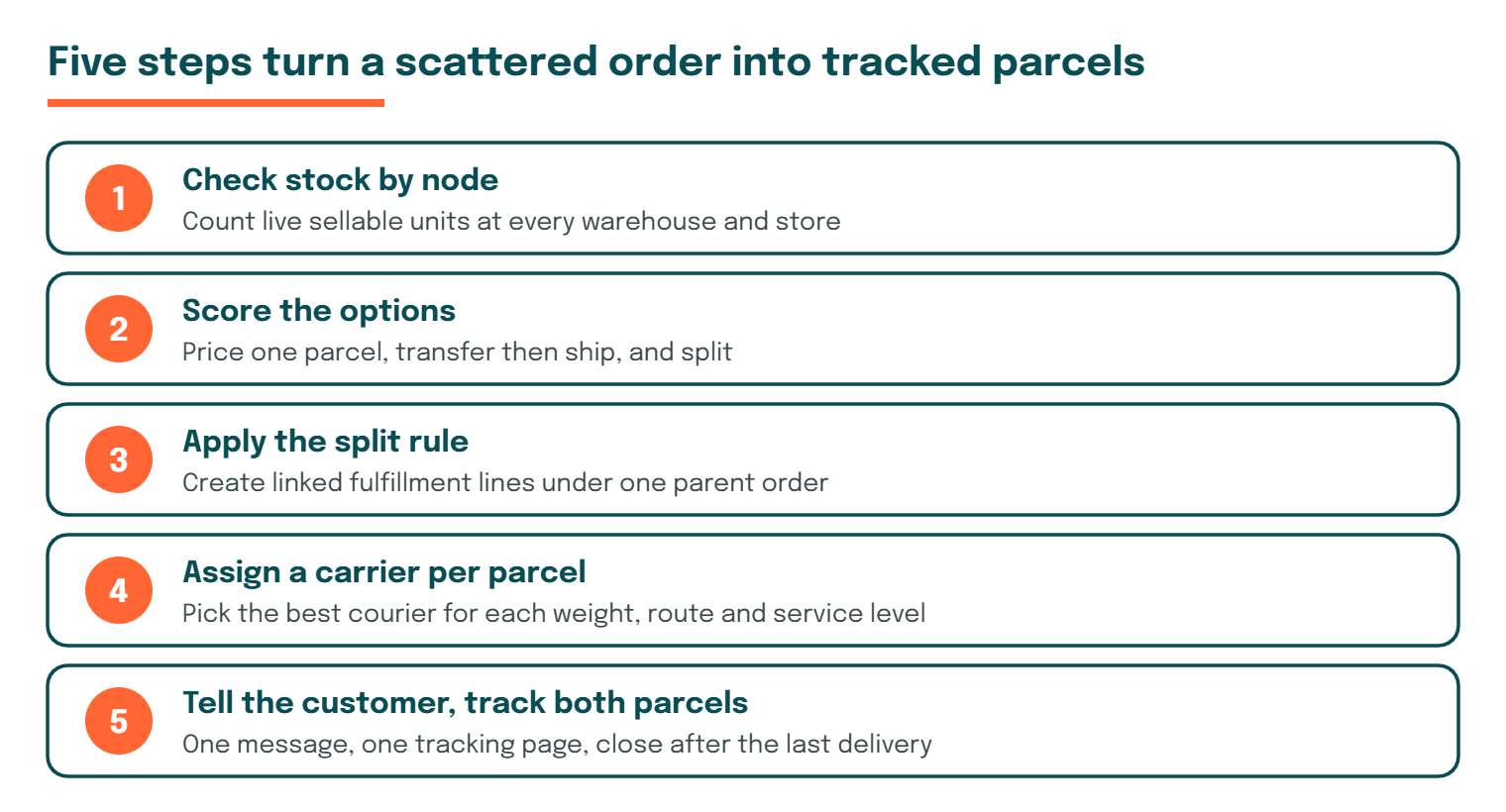
A repeatable workflow keeps split shipment in ecommerce from turning into daily manual firefighting. The infographic below shows the five steps, and the sections after it explain each one.
Step 1: Check stock by node
When an order arrives, query live stock at every warehouse, store, and dark store. Count only sellable units, not stock that is damaged or reserved. A wrong count at this step causes every later error.
Step 2: Score the options
Price the order three ways: ship all from one node, transfer then ship, or split. Include freight, packaging, handling, and the expected cost of delay. Pick the cheapest option that still meets the delivery promise.
Step 3: Apply the split rule
Run your rules from the decision table, in a fixed order, so two similar orders never get different treatment. If the order qualifies, create two or more fulfillment lines and keep them linked to one parent order. Never let the lines drift into separate orders, because support teams then lose the full picture.
Step 4: Assign a carrier per parcel
Each parcel has its own weight, route, and service level. Pick the best courier for each one, not one courier for the whole order. A multi-carrier setup makes this routine; a single-carrier setup makes it painful.
Step 5: Tell the customer, then track both parcels
Send one message that explains the split before the customer finds out the hard way. Show both parcels on a single tracking page. Close the order only after the last parcel is delivered or returned.
Fulfillment Options Compared
Split shipment in ecommerce is one of four ways to handle an order with scattered stock. This comparison shows where each option fits.
| Option | Speed to customer | Cost per order | Customer experience | Best for |
|---|---|---|---|---|
| Single shipment, one node | Fastest | Lowest | Cleanest | Orders fully stocked in one node |
| Hold until restock | Slowest | Low | Frustrating if long | Short restock gaps |
| Transfer, then ship once | Medium | Medium | Good, but late | High-value or fragile baskets |
| Split shipment | Fast for part, later for rest | Highest | Mixed unless communicated | Long gaps, express promises |
The table shows why the answer changes by order. Split shipment in ecommerce is the most expensive route per order, but it protects speed when speed matters most.
Split Shipment in Ecommerce by Business Model
The same rule does not suit every seller. A D2C brand with one warehouse splits rarely, while a marketplace with many sellers splits all the time. Match your approach to your model.
| Business model | Main reason for splits | Smart approach |
|---|---|---|
| D2C brand, one warehouse | Stock-outs on single lines | Time-limited backorder rules |
| D2C brand, multiple warehouses | Stock spread across nodes | Nearest-node allocation with transfer limits |
| Marketplace | Different sellers per item | Seller-level tracking and clear messaging |
| B2B and bulk orders | Weight, pallet, and dock limits | Planned multi-parcel or freight splits |
| Omnichannel retailer | Store stock mixed with warehouse stock | Ship-from-store rules by distance |
Smaller teams should start with the first row and add complexity only when volume demands it. Larger teams benefit most from automating split shipment in ecommerce at the allocation step, before a person ever sees the order.
How to Tell Customers About a Split Order
A split is only a problem when the customer is surprised. Clear words at three moments turn a risk into a minor detail. Write these messages once and reuse them.
At checkout, show a short line such as “Some items may arrive in separate parcels.” Right after the order, confirm which items ship first and give an honest date for the rest. When each parcel ships, send its own tracking link and mention the other parcel by name.
Keep the tone plain and specific. “Your shoes ship today, and your cap follows on Friday” works better than “Your order has been partially processed.” Customers forgive a split they understand.
Planning Split Shipment in Ecommerce for Peak Season
Sales events change the math. Stock moves faster, restock dates slip, and courier capacity tightens. Plan your split shipment in ecommerce rules before the event, not during it.
Review three settings two weeks ahead. First, shorten the backorder limit so customers are not left waiting for a restock that may not come. Second, check the courier mix for each zone so a split second parcel does not meet a congested lane. Third, raise your support capacity for “where is my other item” contacts.
After the event, compare split rate and cost per split order with your normal weeks. Keep the changes that helped and drop the rest.
Payments, Invoices, and Returns on Split Orders
Back-office rules decide whether split shipment in ecommerce feels smooth or messy. Settle them before you launch, because fixing them later means touching live orders.
For prepaid orders, capture payment once at order time and release it against the full order. Refunds then run per parcel, so a return on the second parcel never blocks the first. For cash on delivery, decide whether each parcel collects its own amount, and tell the customer in advance.
Invoices should match the items in each parcel, with the same order reference on both. This keeps tax records clean and helps the customer when they check a delivery against a bill. Returns follow the same logic: allow a request on a single parcel, and tie the reverse pickup to that parcel’s tracking number.
Finally, agree on one source of truth. If your storefront, warehouse system, and shipping platform each hold a different view of the order, split shipment in ecommerce creates mismatches that support teams must clean up by hand.
Split Shipment Checklist for Ecommerce Teams
Use this checklist before you switch on automated splitting. Each item prevents a failure that sellers commonly meet in practice.
- Inventory is updated in near real time across all nodes.
- Every split order stays linked to one parent order ID.
- Split rules exist in writing and have an owner.
- Customers see a clear split message at checkout or right after it.
- Each parcel gets its own label, invoice reference, and tracking number.
- Payment is captured once, and refunds work per parcel.
- COD orders have a separate rule for split cases.
- Returns can be raised per parcel, not only per order.
- Support agents can see all parcels on one screen.
- A weekly report shows split rate and split cost.
If you cannot tick at least eight of these, fix the gaps before you scale splitting.
Common Mistakes With Split Shipment in Ecommerce
Most failures in split shipment in ecommerce come from process gaps, not from the idea itself. These five mistakes show up again and again.
Splitting by default. Some systems split whenever stock is scattered. This inflates freight cost on orders that could have waited a day for a transfer.
Hiding the split. Customers who receive a surprise second parcel often assume an item is lost. A short message at the right time removes most of these contacts.
Charging shipping twice. Adding a second shipping fee for a split the seller caused damages trust. Decide your policy up front and state it clearly.
Ignoring the invoice. Two parcels still need correct tax documents. Match each invoice to the items inside its parcel.
Never measuring it. Without a split rate and a split cost, nobody knows whether the rules help. Start measuring in week one.
KPIs to Track for Split Shipment in Ecommerce
Track a short list of numbers and review them weekly. The table defines each KPI and the question it answers.
| KPI | How to calculate | Question it answers |
|---|---|---|
| Split rate | Split orders ÷ total orders | How often do we split? |
| Cost per split order | Total fulfillment cost ÷ split orders | Is splitting getting expensive? |
| Time to last parcel | Order date to final delivery | How long does the customer wait? |
| Split-related contacts | Support tickets tagged “split” ÷ split orders | Are we communicating well? |
| Split cancellation rate | Cancelled split orders ÷ split orders | Do customers give up? |
| Parcel return rate | Returned parcels ÷ delivered parcels | Do splits cause returns? |
Compare these figures for split and non-split orders. If split orders show far more contacts or cancellations, tighten your rules or improve your messages.
How eShipz Helps With Split Shipment in Ecommerce
Managing split shipment in ecommerce needs two things: clean routing decisions and one view of every parcel. eShipz is a multi-carrier shipping platform, which means each parcel from a split order can go with the courier that fits its weight, route, and service level.
You can compare carrier rates per parcel, generate labels, and follow every shipment from one dashboard. Tracking and NDR workflows then apply to each parcel separately, so a failed delivery on the second parcel does not hide behind a delivered first one.
To see how this fits your own order mix, explore the eShipz shipping platform and test your split rules against real orders. Confirm the exact features available on your plan with the eShipz team before you build a workflow around them.
Conclusion
Split shipment in ecommerce is a trade-off between cost and customer promise. It costs more per order, yet it can protect speed, reduce cancellations, and keep stock moving. The right call changes with the gap length, the order value, and the delivery promise.
Teams that treat split shipment in ecommerce as a measured process, not a surprise, spend less on freight and field fewer angry messages. Start small. Tag your current splits by cause, write three clear rules, and track split rate and cost per split order. Then refine the rules as your data grows, with the help of a platform like eShipz to route and track each parcel.
Frequently Asked Questions
1. What is split shipment in ecommerce?
Split shipment in ecommerce is the practice of sending one customer order in two or more parcels. The parcels may leave from different warehouses or on different days. The customer still pays once.
2. Does split shipment cost more than a single shipment?
Usually yes, because a second parcel adds freight, packaging, and handling. In our illustrative model, a split cost about ₹78 more than a transfer plus one parcel. Your own numbers will differ.
3. When should a seller avoid splitting an order?
Avoid it when the missing item restocks within a day or two, when the order value is low, or when the order is cash on delivery. In those cases, holding the order usually costs less.
4. Should the customer pay shipping twice for a split?
Most sellers do not charge twice when the split is the seller’s choice. Whatever you decide, show the policy at checkout and repeat it in the order confirmation.
5. How do you track a split order?
Link every parcel to one parent order and show all tracking numbers on one page. Send an update when each parcel ships and when the last one is delivered.
6. How do split shipments affect returns?
Returns happen per parcel, so your system must allow a return request on a single parcel. Match each invoice to its parcel to keep refunds clean.
7. Can software automate split shipment in ecommerce?
Yes. Order management and shipping platforms can check stock by node, apply your split rules, and assign a carrier per parcel. Start with simple rules, then add complexity as your data supports it.